
Your Cutoff Date Is the Whole Campaign.
Subscription box brands use Tickvio to put live countdown timers in cutoff emails, add-on windows, and referral deadlines — converting last-minute subscribers before the box ships.
Industry
- 42%
- Higher same-month sign-ups when cutoff email shows a live countdown timer
- 37%
- More add-on revenue when the customisation window timer is visible in email
- 8h
- Typical time between email open and subscription when a cutoff timer is shown
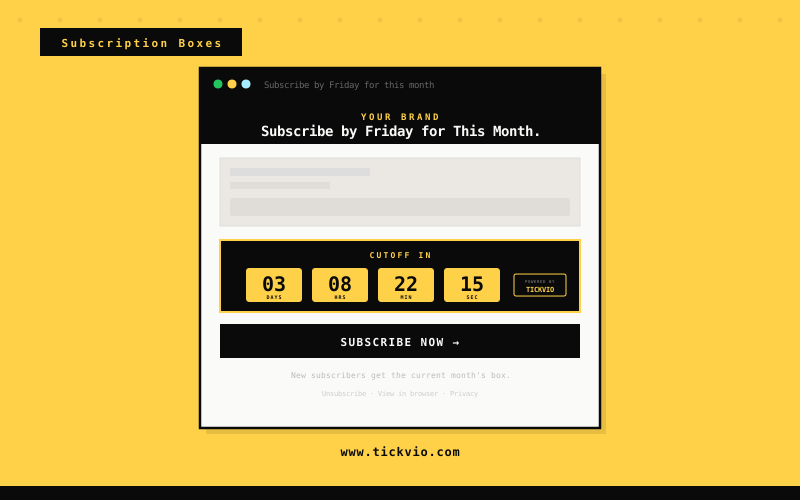
Subscription Box Emails Without a Visible Cutoff Lose Last-Minute Revenue Every Month
Subscription box success depends on a tight monthly cycle — selection cutoffs, add-on windows, and renewal dates all have hard deadlines. But when these are communicated as plain text, subscribers miss the cutoff, skip the add-on, or let their subscription lapse because 'there's always next month.'
A live countdown timer makes every monthly deadline unmissable. When a subscriber sees hours ticking on the box selection cutoff or the add-on window, they take action immediately — driving higher engagement, fewer skips, and better retention every cycle.
The fundamental issue is that text-based urgency has been devalued by overuse. Subscribers have seen 'limited time!' and 'ends soon!' so many times that the words carry no weight. A live countdown timer is materially different — it's a visual, animated proof point that the deadline is real, specific, and actively expiring as the subscriber watches. The timer doesn't make a claim about urgency; it demonstrates it.
How Subscription Boxes brands use timers
Monthly Cutoff Countdown Timers
Show a live countdown to when the current month's box subscription cutoff closes. Last-minute subscribers who see the order window ticking sign up immediately rather than planning to 'start next month' — driving 42% higher same-month conversions.
Add-On & Customisation Windows
Embed a timer on subscription renewal or upgrade deadlines. Existing subscribers who see their renewal bonus window closing commit to another cycle rather than letting the subscription quietly lapse.
New Subscriber Welcome Deal Deadlines
Display a countdown on box customisation or add-on selection windows. Subscribers who see the selection deadline ticking make their choices on time instead of receiving default contents or missing the personalisation window.
Referral Bonus Expiry Timers
Run a timer on referral bonus or credit expiry windows. Subscribers who see their accumulated referral rewards about to expire share referral links and make redemption purchases before the balance resets.
Pause & Save Offer Countdowns
Show a countdown on upgrade tier offer windows. Subscribers considering a move from the basic to premium box commit when they see the discounted upgrade deadline visibly closing in their inbox.
Limited Box Availability Alerts
Embed a timer on reactivation offers for cancelled subscribers. A limited-time 'come back' discount with a visible 72-hour countdown drives significantly more resubscriptions than an open-ended win-back email.
Campaign ideas
| Campaign | What gets personalized | Impact |
|---|---|---|
| Subscribe Before Cutoff | Live timer showing hours left before this month's box closes | AVG. +42% SAME-MONTH SIGNUPS |
| Customise Your Box Window | Timer to final add-on deadline before the box is packed | AVG. +37% ADD-ON REVENUE |
| Referral Bonus Expiry | Countdown to when the subscriber's referral credit expires | AVG. +29% REFERRAL REDEMPTION |
Timer templates
Proven layouts for Subscription Boxes — each drops into any ESP as a single image URL.
Your brand
Limited-time offer inside
Bold teal block timer
monthly cutoff and box selection deadline emails. Unmissable urgency for time-critical subscription communications.
Your brand
Limited-time offer inside
Minimal timer
clean and unobtrusive, ideal for add-on and customisation window emails within box reveal templates.
Your brand
Limited-time offer inside
Pill compact timer
suited to referral credit expiry and limited box availability alert emails.
Subscription box success depends on a tight monthly cycle — and the cutoff date is the single most important conversion moment in that cycle. Tickvio countdown timers make the box closing time visible and urgent inside every cutoff reminder email. Brands that show a live timer on their monthly close email see significantly higher same-month sign-up rates and add-on revenue than those that state the deadline in text only.
Tickvio's timer renders as an animated GIF that works in Gmail, Apple Mail, Yahoo, Outlook (static fallback), and every major mobile email client. No JavaScript, no iframes, no compatibility concerns. The timer updates on every open, showing the accurate remaining time whether the subscriber opens the email five minutes or five days after send. For brands using Klaviyo, Mailchimp, Omnisend, ActiveCampaign, or any other ESP — the embed is a single line of HTML that drops into any template.
Explore how other industries use Tickvio countdown timers: Pet Industry, Grocery & Meal Delivery, and Food & Beverage. Or get started with your first timer in under five minutes — see a live demo to preview how it looks in your email.
Klaviyo · Mailchimp · Omnisend · ActiveCampaign · Drip · Brevo · Postscript · Attentive · Campaign Monitor · SendGrid
First name · Box tier · Subscription tenure · Cutoff date · Add-on selection deadline · Referral credit balance · Next ship date · Loyalty milestone
Frequently asked questions
Can I show the cutoff timer in both marketing and transactional emails?
Can I run a different timer for each box tier?
What if my cutoff time changes from month to month?
Does it work with Recharge or Cratejoy?
Ready to add urgency
to every send?
Your first timer takes less time than reading this sentence. Free plan. No credit card. No kidding.
Free plan includes 20,000 views/mo · No credit card required