
Make Your Trial Deadline the Most Visible Thing in the Email
SaaS companies that show a live countdown to trial expiry, onboarding windows, or limited-time offers see dramatically higher plan conversions and feature adoption.
Industry
- 31%
- Higher trial-to-paid conversion when trial expiry email includes a live countdown
- 27%
- Increase in annual plan upgrades with a visible deadline on the offer email
- 52%
- Higher webinar show rate when countdown timer appears in confirmation email
SaaS Emails Without Urgency Signals Get Postponed Indefinitely
SaaS prospects live in their inbox — and they're experts at deferring decisions. A trial expiry notification without a visible countdown gets archived alongside a hundred other emails. The trial expires silently, and a qualified prospect churns without ever converting.
This pattern repeats across every SaaS email type: annual plan offers get bookmarked and forgotten, webinar registrations are planned but never completed, and feature launch emails are opened once and never acted on. The common thread is that none of these emails communicate a deadline the recipient can feel. A line of text saying 'your trial ends Friday' is easy to dismiss. A live timer showing 23 hours and 14 minutes remaining is not.
A live countdown timer makes SaaS deadlines impossible to postpone. When a user sees hours ticking on their trial period, a pricing change, or a webinar registration close, they take the action they've been planning to do 'tomorrow' for the past week. The timer doesn't create false urgency — it makes real urgency visible.
How SaaS & B2B brands use timers
Trial Expiry Countdowns
Show a live countdown to when a trial period expires. Each user sees the exact remaining time from the moment they open the email — not from when it was sent. Trial expiry emails with visible timers convert to paid plans at 31% higher rates because the deadline is concrete and undeniable. For SaaS companies running 7, 14, or 30-day trials, the timer transforms a forgettable reminder into an urgent conversion event. Best practice: send the timer email 72 hours before expiry with a follow-up at 24 hours.
Annual Plan Discount Deadlines
Show a live countdown to the exact moment a trial period expires. Users who see days and hours ticking on their trial convert to paid plans at 31% higher rates because the deadline is concrete — not a vague 'your trial is ending soon' message buried in copy. The timer works especially well in the final 72 hours of a trial, when the decision to convert or churn is actively being made. Place the timer above a clear upgrade CTA for maximum impact.
Onboarding Window Timers
Embed a timer on annual plan upgrade offers showing when the discounted rate closes. Monthly subscribers who see a visible deadline on annual pricing commit to the upgrade before the offer reverts to standard pricing. Annual plan upgrades are one of the highest-LTV conversion events in SaaS — and they're also one of the easiest to procrastinate on because subscribers assume the offer will return. A visible timer eliminates that assumption and drives immediate commitment to the higher-value plan.
Webinar & Demo Registration Close
Display a countdown to when webinar registration closes or when the live session begins. Limited-seat webinars with visible countdowns fill faster and have higher attendance rates because registrants see the approaching deadline and prioritise showing up. For confirmation and reminder emails, show the timer counting down to the start time — attendees who see '2 hours until we go live' are far less likely to forget or double-book.
Early Adopter Pricing Windows
Show a countdown on early adopter pricing windows for new features or plan tiers. Beta pricing or founder pricing with a visible close date drives faster adoption from users who want the discount but need a deadline to commit. This is particularly effective for product-led growth companies launching new pricing tiers — the timer communicates that the introductory rate is genuinely temporary.
Renewal Reminder Deadlines
Run a timer on reactivation offers for churned accounts. A limited-time comeback discount with a visible 72-hour countdown drives significantly more reactivations than an open-ended 'we miss you' email that sits in the inbox indefinitely. Churned users have already decided to leave — an open-ended offer gives them no reason to reconsider today. A ticking countdown forces the reconsideration into a specific window, which is the only way to cut through the inertia of a cancellation decision.
Campaign ideas
| Campaign | What gets personalized | Impact |
|---|---|---|
| Trial Expires In... | Countdown to exact trial end, unique per subscriber sign-up date | AVG. +31% TRIAL-TO-PAID |
| Annual Plan Offer | Live timer to pricing offer expiry for upgrade campaign | AVG. +27% UPGRADE RATE |
| Webinar Registration Closes | Timer to webinar start time shown in confirmation & reminder emails | AVG. +52% SHOW RATE |
Timer templates
Proven layouts for SaaS & B2B — each drops into any ESP as a single image URL.
Your brand
Limited-time offer inside
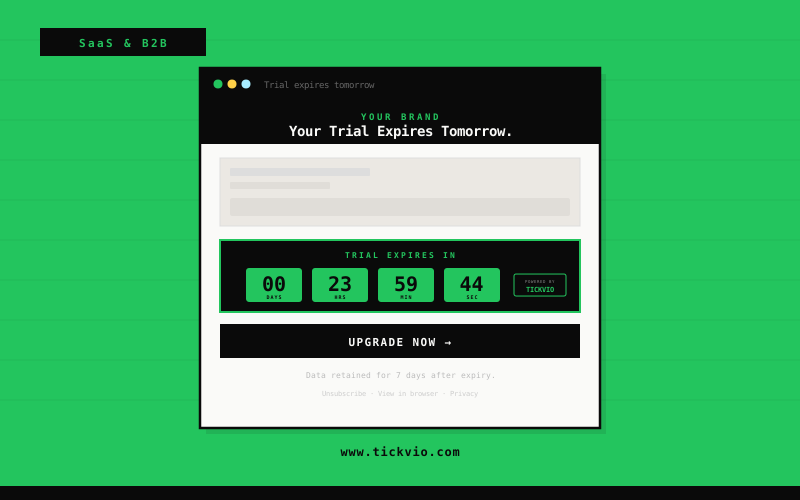
Professional dark block timer
trial expiry and annual plan offer deadline emails. Clear and authoritative for B2B and SaaS audiences.
Your brand
Limited-time offer inside
Minimal timer
understated and professional, ideal for webinar registration close and early adopter pricing window emails.
Your brand
Limited-time offer inside
Pill compact timer
works for renewal reminder and feature launch early access deadline emails within product-focused SaaS templates.
SaaS prospects live in their inbox — and they're experts at ignoring it. Tickvio countdown timers give SaaS brands a way to make trial expiry, pricing offer close dates, and webinar start times feel genuinely time-sensitive inside the email. A live trial countdown in an expiry reminder email drives higher trial-to-paid conversion than any static-deadline version of the same message.
The most effective SaaS email programmes use timers at three critical inflection points: trial-to-paid conversion (evergreen timer counting from each user's trial start), expansion revenue (fixed-date timer on annual pricing offers or feature upgrade windows), and engagement (timer on webinar, demo, or event registration close). Each timer type serves a different revenue goal, but all share the same mechanism: making a real deadline visually undeniable in a medium where text-based urgency has been trained out of the recipient.
Tickvio timers render in Outlook (static fallback), Gmail, Apple Mail, and every B2B-relevant email client. The timer is a standard HTML image tag — no JavaScript, no iframes, no IT department approval needed. A product marketer or growth lead can create a timer, copy the embed code, and paste it into a HubSpot sequence in under five minutes.
Explore how other industries use Tickvio countdown timers: Education, Pharmacy, and Real Estate. Or get started with your first timer in under five minutes — see a live demo to preview how it looks in your email.
HubSpot · Salesforce Marketing Cloud · Mailchimp · ActiveCampaign · Brevo · Intercom · Drip · Kit · Iterable · SendGrid
Company name · First name · Trial expiry date · Plan tier · Usage summary · Webinar date · Early adopter window · Renewal date · Feature interest
Frequently asked questions
Can I show a unique expiry time per subscriber based on their trial start date?
Will countdown timers work in Outlook, which many B2B users rely on?
Is this appropriate for professional B2B emails or does it look too salesy?
Can I use it in automated drip sequences, not just one-off campaigns?
Ready to add urgency
to every send?
Your first timer takes less time than reading this sentence. Free plan. No credit card. No kidding.
Free plan includes 20,000 views/mo · No credit card required