
Events have natural deadlines — registration closes, early-bird pricing expires, the event starts. A countdown timer makes every one of these moments tangible in your promotional emails, transforming abstract dates into ticking urgency that drives registrations and attendance.
How it works
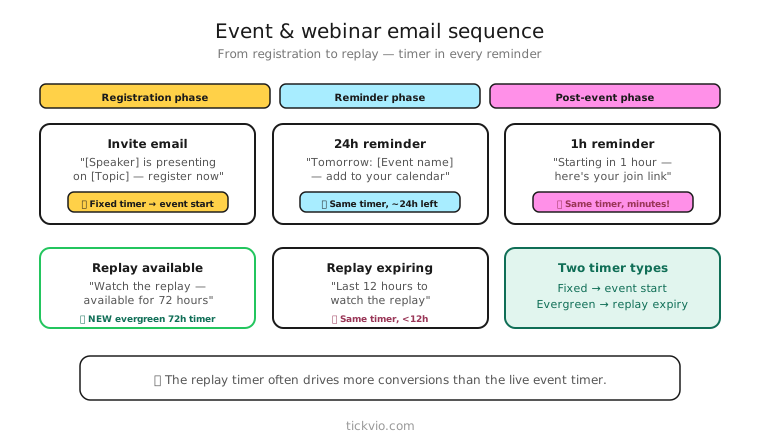
Use a fixed deadline timer counting down to the event start, the registration deadline, or the early-bird pricing cutoff. One timer URL works across your entire event email sequence — create it once in Tickvio and embed it in every email.
The timer is a server-rendered animated GIF that updates every time a subscriber opens the email. No JavaScript, no special ESP features needed. For the technical details, see our complete countdown timer guide.
Event email sequence
A typical event promotion spans 4–6 emails, each serving a different function. Here's how to integrate timers at each stage:
Email 1: Announcement (2–4 weeks before). Introduce the event, share details, highlight speakers or agenda. No timer yet — the event is too far away for countdown urgency to work. Save the timer for when the deadline is actionable.
Email 2: Early-bird deadline approaching (1–2 weeks before). If you have tiered pricing, introduce the timer counting down to when early-bird pricing ends. "Early-bird tickets at $99 end in [TIMER]. After that, it's $149." This is the first urgency moment — a financial deadline.
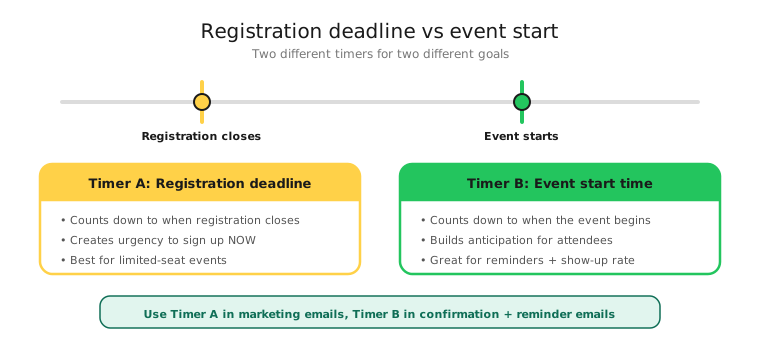
Email 3: Registration closing soon (3–7 days before). Timer counting down to registration close. "Only [X] spots remaining. Registration closes in [TIMER]." The urgency shifts from price to access.
Email 4: Day-of reminder (morning of the event). Timer counting down to the event start time. "Starting in [TIMER] — join the live stream here." For virtual events, this is the attendance driver.
Email 5: Post-event follow-up (1 day after). No timer. Thank attendees, share recordings, promote the next event. This is where you plant the seed for the next countdown.
Registration deadline vs event start time
A common mistake is mixing these two deadlines in the same sequence. Early emails should count down to the registration or pricing deadline. Day-of emails should count down to the event start time. Don't put both timers in the same email — one email, one deadline, as per our best practices.
Virtual vs in-person events
Virtual events and webinars: The timer drives both registration and attendance. The day-of countdown is critical because virtual events have high no-show rates. A ticking clock on event day converts registrants into actual attendees.
In-person events: The timer primarily drives early registration and ticket purchases. The day-of email is less about "starting in [TIMER]" and more about logistics: "Doors open in [TIMER] — here's your parking and check-in info."
Both benefit from post-expiry handling — "Registration is closed" or "This event has started — watch the recording here."
Copy examples for event timers
Early-bird pricing: "Early-bird tickets end in [TIMER]. Lock in your spot at $99 before the price jumps to $149." Clear financial consequence.
Limited capacity: "Only 50 seats left. Registration closes in [TIMER]." Combines time and quantity scarcity. Only use if capacity is genuinely limited.
Webinar attendance: "We're going live in [TIMER]. Grab your spot — the replay won't include live Q&A." Creates a reason to attend live rather than watch later.
Conference FOMO: "3,000 marketers are already registered. Join them before registration closes in [TIMER]." Social proof + deadline.
Common mistakes
Timer weeks before the event. A countdown showing "14 days 6 hours" doesn't create urgency — it creates the opposite. Save the timer for when the deadline is 7 days or fewer.
No post-event expiry handling. Subscribers who open registration emails after the event see a frozen timer and a dead registration link. Configure an expiry state: "This event has ended — sign up to be notified about the next one."
Mixing deadlines in one email. "Early-bird pricing ends Friday AND the event starts Monday" with two timers is confusing. One deadline per email.
Industry applications
Event timers work across: online education (webinars, course launches, open days), real estate (open house deadlines, auction countdowns), nonprofits (fundraiser deadlines, gala registration), weddings and events (RSVP deadlines), and financial services (webinar series, client events).
What to measure
Registration rate: Compare timer vs non-timer promotional emails for the same event.
Early-bird conversion: What percentage of registrations happen before the early-bird deadline?
Day-of attendance rate: For virtual events, does the day-of timer email improve show-up rates?
Post-event replay signups: Does the expiry state drive replay or next-event signups?
For the complete measurement framework, see our analytics guide.
ESP setup
Event timers work with every major email platform. For step-by-step instructions, see our guides for Klaviyo, Mailchimp, ActiveCampaign, HubSpot, and all supported integrations.
Get started
Create a free event countdown timer — set your event date, customise the design, configure the post-event expiry state, and embed across your promotional sequence. One timer URL, every email in the series.