
Free trial users already know your product. They've signed up, explored features, and formed an opinion. What they often lack is a reason to act now. A countdown timer in your trial expiry emails creates that reason — transforming a passive expiration into an active decision point.
How it works
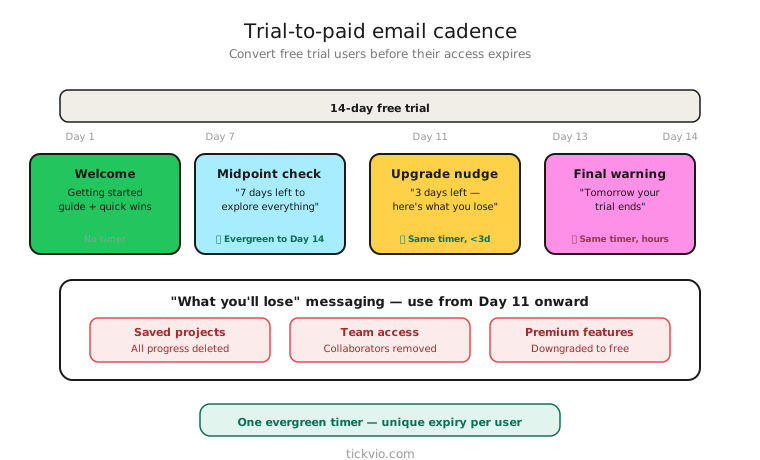
Use an evergreen timer tied to each user's trial start date. If your trial is 14 days, the timer starts counting down from when that user signed up. Everyone gets a personal deadline — no shared cutoff dates, no one-size-fits-all urgency.
Tickvio's evergreen timer feature handles this automatically. Set the countdown window to match your trial length, and each user sees their own personal expiry countdown every time they open an email.
Email sequence
Start reminding early — not just on the last day. Here's a proven structure for a 14-day trial:
Day 7: Midpoint nudge (no timer). A value-focused check-in. "Here's what you can do with [Product] this week." No urgency yet — the goal is engagement, not pressure.
Day 11: "3 days left" (introduce the timer). The first appearance of the countdown. "Your free trial expires in: [TIMER]. Upgrade now to keep everything you've built." Timer in companion position, near the upgrade CTA.
Day 13: "Tomorrow" (timer in hero position). Escalated urgency. "Your trial ends tomorrow. After that, you'll lose access to [specific features]." The timer shows hours, not days, making it feel immediate.
Day 14: Expiry day (final push). "Your free trial expires today at [time]. [TIMER]" Minimal copy, maximum urgency. The timer is the message.
Day 15: Post-expiry (no timer). "Your trial has ended. Here's what you can still do — upgrade to restore access." This is where your expiry state matters.
"What you'll lose" messaging
The timer alone isn't enough — pair it with clear, specific consequences of inaction. Generic "upgrade now" copy doesn't work as well as specific loss messaging:
Feature-specific: "When your trial ends, you'll lose access to [analytics dashboard / team collaboration / custom reports]. Upgrade to keep them."
Data-focused: "You've created 47 projects during your trial. Upgrade in [TIMER] to keep them all — or they'll be archived."
Progress-based: "You've spent 12 hours in [Product] this month. Don't start over — upgrade and keep your momentum."
The more specific you can be about what the user has done and what they'll lose, the more effective the timer becomes.
Grace period strategy
Some businesses offer a brief grace period after trial expiry — 3 to 7 days where the account is locked but data is preserved. If you do this, the post-expiry email can use a second timer: "Your data will be permanently deleted in [TIMER]. Upgrade now to restore access."
This creates a second urgency window that's even more powerful because the stakes (data loss) are higher than the original (feature loss). However, only use this if you actually delete data after the grace period.
Common mistakes
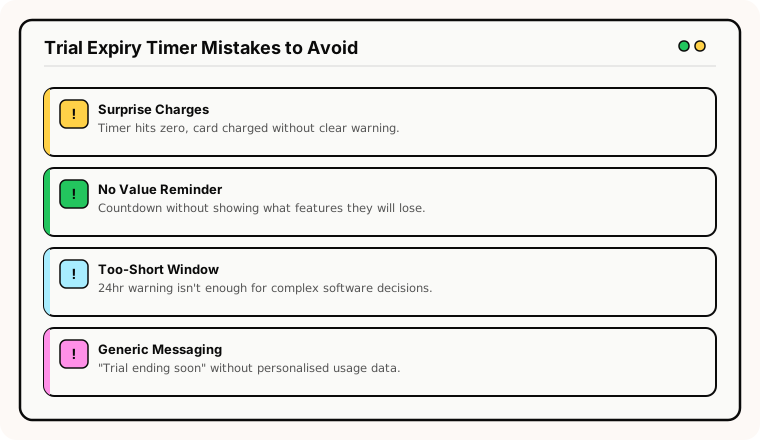
Only emailing on the last day. By day 14, the user may have already mentally moved on. Start the countdown sequence at least 3 days before expiry.
Generic upgrade messaging. "Your trial is ending soon" doesn't motivate action. Specifics do: what features they'll lose, what data they've created, what workflows will break.
No post-expiry plan. Users who don't upgrade during the trial may upgrade later. A frozen 00:00:00 timer in their inbox doesn't help. Configure a helpful expiry state.
Timer without a clear upgrade path. The CTA must go directly to a pricing/upgrade page — not the general homepage, not a feature page. Reduce friction between seeing the timer and completing the upgrade.
Best practices
Follow timer placement best practices — place the timer near the upgrade CTA, not as a hero image at the top of the email. Label it clearly: "Your free trial expires in:" so there's no ambiguity about what the countdown represents.
Ensure the pricing/upgrade page reflects the same deadline. If the email shows 3 hours remaining, the upgrade page should acknowledge the trial is ending soon.
Industry fit
Trial expiry timers are particularly effective for SaaS and software (the most common use case), online education platforms (course access trials), subscription services (first-box trials), and health and wellness apps (premium feature trials).
What to measure
Trial-to-paid conversion rate: The primary metric. Compare timer cohort vs no-timer cohort over at least 4 weeks.
Upgrade timing: Do more upgrades happen during the final 3 days (when the timer is active)? If yes, the timer is working.
Post-expiry reactivation rate: How many expired trial users come back and upgrade within 30 days? A good expiry state improves this metric.
Engagement with expiry emails: Open rates, click-through rates, and spam complaint rates on timer emails vs non-timer emails in the sequence.
For the complete measurement framework, see our analytics and A/B testing guide.
ESP setup
Trial expiry timers work within any ESP or marketing automation platform that supports automated flows triggered by signup events. For platform-specific instructions, see our guides for Klaviyo, Mailchimp, ActiveCampaign, HubSpot, and all supported integrations.
Get started
Create a free evergreen timer for your trial expiry flow. Set the window to match your trial length, configure the expiry state, and embed in your onboarding automation. Each trialist gets their own personal countdown — no manual deadline management needed.