
Flash sales thrive on urgency. But writing "Hurry!" in a subject line doesn't create it — showing the exact time remaining does.
A countdown timer embedded in your flash sale emails turns an abstract deadline into something visceral. Subscribers see hours, minutes, and seconds ticking away. The decision to act becomes immediate, not something to think about later.
How it works
Create a fixed deadline timer in Tickvio. Set the end date and time of your sale, customise the design to match your brand, and copy the image URL into your email template. Every subscriber who opens the email sees the live countdown to the same deadline.
The timer is a server-rendered animated GIF — it works in every email client that supports images, which is virtually all of them. No JavaScript, no special ESP features needed. Just an <img> tag. For technical details on how this works under the hood, see our complete countdown timer guide.
The 7-part flash sale email flow
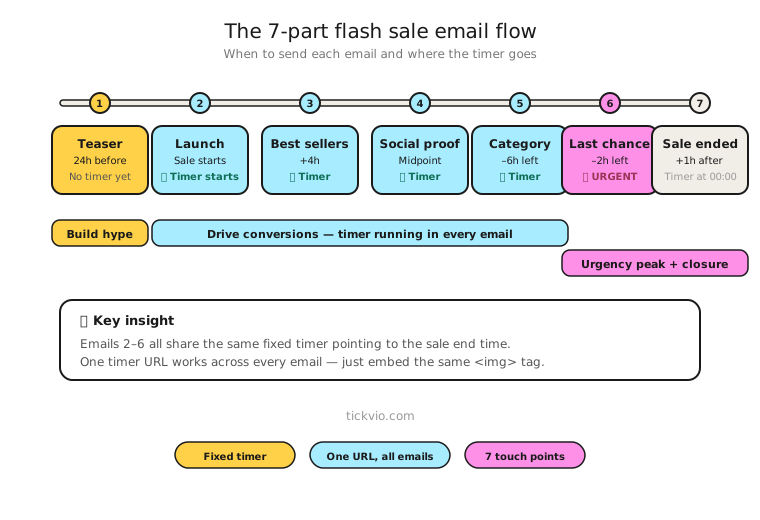
The most effective flash sale sequences use timers strategically — not in every email. Here's the recommended structure:
Email 1: Early announcement (48–72 hours before). Build anticipation. Tease the sale, mention dates, but don't include a timer yet. The goal is awareness, not action.
Email 2: Sale launch (hour zero). The sale is live. Introduce the timer in hero position — full width, directly below the headline. This is the anchor email of the sequence.
Email 3: Best sellers / curated picks (12–24 hours in). Give subscribers a reason to browse. Timer in companion position — above the CTA, not as the hero. The products are the focus; the timer adds background urgency.
Email 4: Social proof / momentum (midpoint). Show that others are buying. "2,400 orders in the last 12 hours." Timer placement: inline, between social proof and CTA.
Email 5: Last chance (6–12 hours remaining). The urgency email. Timer back in hero position. Copy shifts from "browse" to "act now or miss out."
Email 6: Final hour (60–90 minutes remaining). Only send to non-purchasers. The timer is the email — minimal copy, maximum urgency. This is where the highest conversion rates happen.
Email 7: Post-expiry wrap-up (1–6 hours after). No timer. Close the loop. "The sale has ended — here's what sold out" or "Thanks for shopping." This is where your post-expiry strategy matters.
For the full sequence with copy templates and detailed timer placement guidance, read our flash sale email flow playbook.
Copy examples that work
The timer itself creates urgency, but the supporting copy determines what action subscribers take. Here are frameworks that pair well with countdown timers:
The "what you'll miss" frame: "30% off ends in [TIMER]. After midnight, everything returns to full price." Focus on loss, not gain — people are more motivated by what they'll miss than what they'll get.
The specificity frame: "This offer ends at 11:59 PM EST tonight." The more specific the deadline, the more credible it feels. The timer makes this specificity visual.
The consequence frame: "When the timer hits zero, the discount code stops working. No extensions, no exceptions." Tell subscribers what changes after zero — and mean it.
Why flash sale timers work
Fixed deadline timers are the most straightforward timer type. Everyone shares the same cutoff, enforcement is simple (the sale actually ends), and the subscriber experience is clear. There's no ambiguity about what's happening or when.
The psychology is well-documented: visible, specific deadlines reduce procrastination and increase the perceived value of the offer. A ticking clock creates what researchers call "temporal scarcity" — the sense that an opportunity is actively shrinking. This is different from vague urgency language, which sophisticated subscribers have learned to ignore.
Common mistakes to avoid
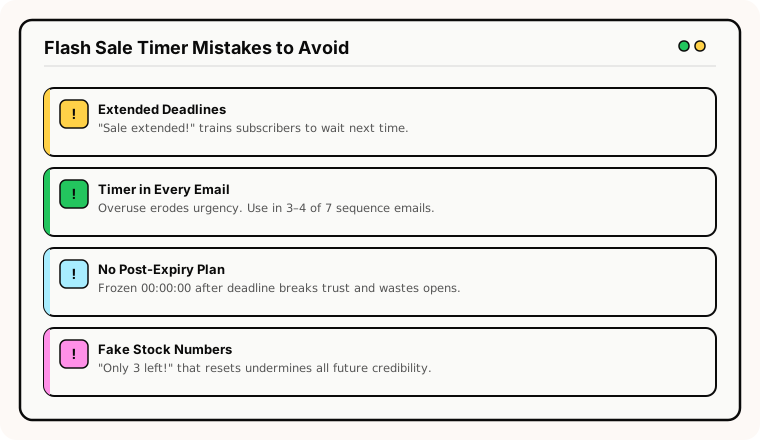
Timer in every email of the sequence. This is the fastest path to fatigue. Use the timer in 3–4 of the 7 emails, not all of them.
Extending the sale after the timer expires. If subscribers see "Extended!" after the timer hit zero, they've learned that your deadlines are meaningless. Never do this. The next time you run a timer, nobody will believe it. Read more about this in our ethics and best practices guide.
No expiry state configured. Subscribers who open your email after the sale ends see a frozen 00:00:00 with a link to a full-price product page. Configure a proper expiry state — Tickvio handles this automatically.
Timer disconnected from the CTA. Place the timer near your primary call-to-action button, not as a decorative hero image at the top of the email.
What to monitor
Track these metrics across your flash sale sequence to ensure timers are helping, not hurting:
Click-through rate (CTR) — The immediate impact metric. Compare timer emails to non-timer emails in the same sequence.
Conversion rate — CTR without conversion means the timer created curiosity clicks, not purchase intent. Both need to move together.
Unsubscribe rate — A meaningful increase signals the urgency is alienating subscribers rather than motivating them.
Spam complaint rate — The most serious negative signal. More in our deliverability guide.
Use our A/B testing framework to confirm the timer is actually lifting conversion, not just generating clicks.
Landing page consistency
Your email timer says "6 hours left." The subscriber clicks through. If the landing page shows no timer, no deadline mention, or a different time — trust breaks immediately. Ensure your landing page timer matches the email timer. Same deadline, same urgency.
ESP setup
Flash sale timers work with every major email platform. For step-by-step embed instructions, see our guides for Klaviyo, Mailchimp, ActiveCampaign, HubSpot, and 50+ more ESPs.
Get started
Create a free flash sale timer — set your deadline, customise the design to match your brand, configure the expiry state, and copy the image URL into your email template. One timer URL works across your entire sale sequence. No credit card required.