
Cart abandonment emails already have strong intent behind them — the subscriber picked products, added them to a cart, and left. A countdown timer turns that lingering intent into action by making the recovery window tangible.
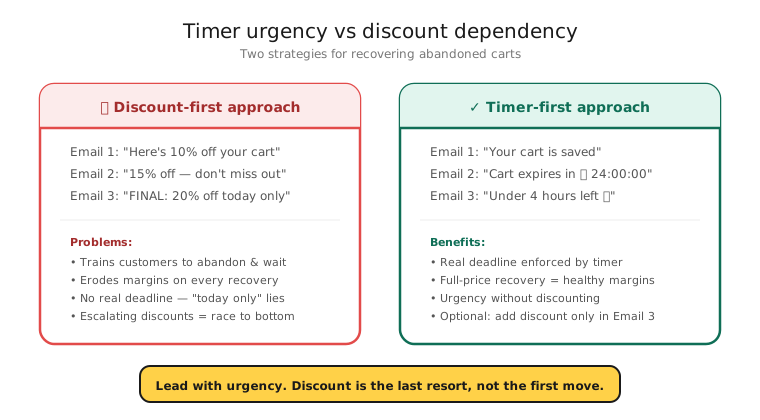
But abandonment timers come with a trap: if every abandoned cart triggers a discount with a countdown, you train customers to abandon carts deliberately. The key is using timers strategically — in the right email, at the right moment, with genuine enforcement.
How it works
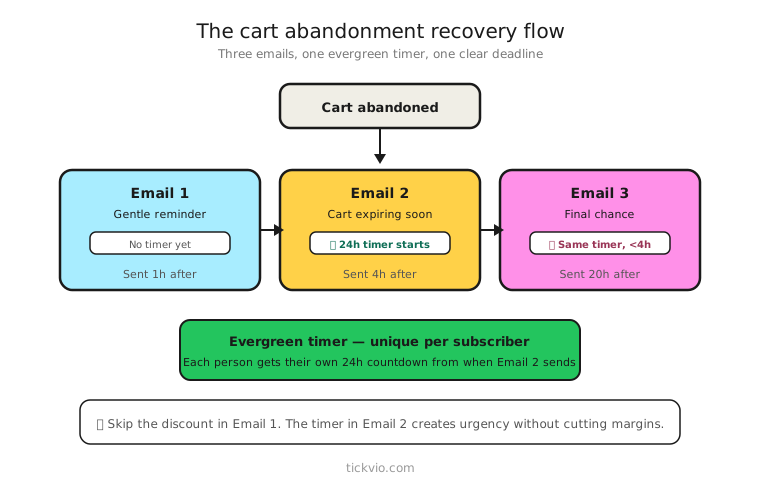
Use an evergreen timer so each subscriber gets their own countdown window. "Your cart is saved for 24 hours" — starting from when that person abandoned. The deadline is personal, not shared.
Unlike a flash sale timer where everyone counts down to the same moment, an evergreen timer creates a per-recipient deadline. Someone who abandons at 2 PM gets a 2 PM Tuesday deadline. Someone who abandons at 9 PM gets a 9 PM Tuesday deadline. Each person's clock starts at their moment of abandonment.
Tickvio's evergreen timer feature handles this automatically — set the window (12, 24, or 48 hours) and the timer calculates each recipient's personal deadline.
The abandonment email flow
Don't put a timer in every email of the sequence. Here's the recommended structure:
Email 1: Gentle reminder (1–3 hours after abandonment). No timer. No discount. Just a clean reminder of what they left behind: product image, name, price. The goal is to catch people who got distracted, not to pressure them.
Email 2: Timer + optional incentive (6–12 hours after abandonment). This is where the countdown timer goes. "Complete your purchase in the next 12 hours" or "Your cart expires in [TIMER]." If you're offering an incentive (free shipping, small discount), pair it with the timer. Use an evergreen timer so the countdown is personalised to each abandoner.
Email 3: Final touch (24–48 hours after abandonment). No timer. Different angle entirely — product reviews, social proof, alternative products, or a simple "Still thinking about it?" This email exists for the people the timer didn't convert, so repeating the same urgency tactic won't work.
For the complete strategy including when not to use timers and how to avoid training discount-seekers, read our cart abandonment timer guide.
Copy examples for abandonment timers
Cart reservation framing: "We're holding your items for 24 hours. After that, they go back to general inventory." This works particularly well for popular or limited-stock items.
Incentive + deadline: "Complete your order in the next 12 hours and get free shipping. [TIMER]" Clear value, clear deadline.
No-discount urgency: "Items in your cart are popular — we can hold them for 6 hours." Urgency through scarcity and convenience, not price. This avoids the discount-dependency trap.
The discount dependency trap
This is the single biggest risk with cart abandonment timers. Here's how it works:
You add a 10% discount with a timer to your abandonment flow. Recovery rates go up. Great. But over the next few months, customers learn that abandoning a cart = getting a discount. Your abandonment rate rises. Your full-price purchase rate drops. The timer is still "working" (recovery rates look good) but your overall revenue is declining because you've trained people to wait.
How to avoid it: Reserve discount timers for first-time buyers, high-value carts, or customers who haven't purchased in 90+ days. Use cart reservation framing (no discount) for repeat buyers. Track full-price purchase rate as a long-term health metric. More in our measurement guide.
Enforcement matters
The discount code or incentive must actually expire when the timer hits zero. If the code still works after the deadline, you've just taught the subscriber that your deadlines are fake — and they'll ignore the timer next time. See the enforcement checklist for implementation details.
Configure a proper expiry state so subscribers who open after the deadline see something intentional: "Your cart reservation has expired — browse current deals" rather than a frozen 00:00:00.
Industry-specific patterns
E-commerce and retail: Timer + free shipping often outperforms timer + percentage discount. Free shipping feels like removing a barrier; a discount feels like a negotiation.
Luxury and jewellery: Never discount. Use cart reservation timers that emphasise exclusivity and limited availability, not price.
SaaS and software: Trial extension or feature unlock timers often work better than abandonment discounts. "Complete signup in the next 24 hours to get 7 extra days free."
Subscription boxes: "Secure your spot in this month's box — orders close in [TIMER]." Real operational deadlines are the most credible.
What to measure
Track both short-term and long-term metrics — the short-term numbers will look great even if the long-term impact is negative:
Short-term: Recovery rate, revenue per email, click-through rate, time to purchase after abandonment.
Long-term: Full-price purchase rate over 90 days, repeat abandonment rate (is it increasing?), customer lifetime value by cohort, and discount code usage after expiry (are people getting around the deadline?).
For the complete measurement framework, see our analytics and A/B testing guide.
ESP setup
Abandonment timers work within any ESP's automation/flow builder. For platform-specific instructions, see our guides for Klaviyo, Mailchimp, ActiveCampaign, HubSpot, and all supported integrations.
Get started
Create a free evergreen timer for your abandonment flow. Choose your window (12, 24, or 48 hours), configure the expiry state, customise the design, and embed the image URL in your ESP's cart abandonment automation. One URL, personalised deadlines for every abandoner.