
Turn Every Email Into a Ticking Opportunity
E-commerce brands that add live countdown timers to their emails see shoppers act faster, abandon carts less, and convert at rates they couldn't reach before.
Industry
- 34%
- Average conversion lift with countdown timers in flash sale emails
- 28%
- Increase in cart recovery when timer shows item hold expiry
- 9 min
- Average time-to-purchase after opening an email with a live timer
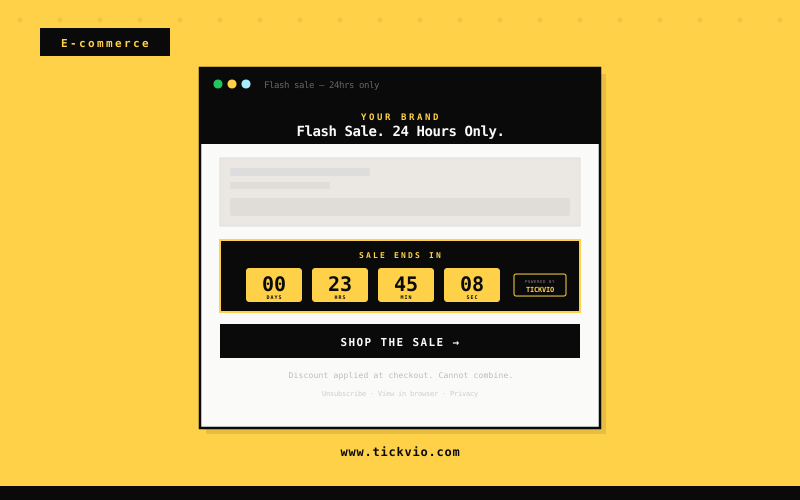
Why E-commerce Emails Lose Sales Without Urgency
E-commerce emails compete for attention in an inbox that's already overflowing. A 'flash sale' without a visible deadline feels like every other promotional email — easy to scroll past and forget. Shoppers who intended to buy end up never returning because nothing told them the window was genuinely closing.
The root cause is simple: text-based urgency doesn't work anymore. Subscribers have been trained by years of 'limited time!' claims that turned out to be indefinite. They've learned to ignore deadline copy because it's rarely enforced. A live countdown timer is fundamentally different — it's a visual, animated proof point that the deadline is real, specific, and actively expiring as they watch.
Without that visual signal, your flash sales underperform, your cart recovery emails feel like nagging rather than urgency, and your VIP access windows get treated like standing offers. The gap between a mediocre email programme and a high-performing one is often just this: making the deadline visible instead of merely stating it.
How E-commerce brands use timers
Flash Sale Countdowns
Show a live countdown to when a cart hold expires. When subscribers see their reserved items ticking away, they complete checkout immediately rather than assuming the cart will wait indefinitely. Cart recovery emails with a visible timer consistently see 28% higher recovery rates than identical emails without one — because the timer transforms a gentle nudge into a genuine deadline. For best results, set the timer to 24 or 48 hours from the cart creation event and mention the hold expiry in your subject line to drive opens.
Cart Abandonment Deadlines
Embed a countdown on flash sale windows — 12-hour, 24-hour, or weekend-only pricing. The ticking timer transforms a skimmable promotion into an urgent event that subscribers act on within the first hour of opening. Flash sale emails with visible countdowns generate the majority of their revenue in the first 3 hours after send, compared to a much flatter distribution for text-only deadline emails. The timer works especially well when placed directly above the CTA button, creating a visual urgency sandwich that drives clicks.
Restock Alerts
Display a timer showing when VIP early access closes before the sale opens to the public. Loyalty members who see their exclusive window shrinking purchase at 2–3× the rate of the same offer sent without a timer. The key is that the timer makes the exclusivity time-bound — 'you have 24 hours before everyone else gets access' is far more motivating when the 24 hours is visibly counting down. This use case also reinforces the value of the loyalty programme itself, reminding members that early access is a tangible benefit.
Loyalty Reward Expiry
Run a timer on price drop alerts showing how long the reduced price is guaranteed. Subscribers who see a deadline on a product they've been watching convert immediately rather than waiting for a further reduction that may never come. Price drop emails without a timer give subscribers no reason to act today — the price might stay low for weeks. Adding a 72-hour timer to the price guarantee window creates the urgency that turns browsing into buying, particularly for high-consideration products where shoppers have been researching.
Seasonal Campaign Timers
Show a countdown to when a restocked product's guaranteed availability window closes. Limited restock quantities with a visible timer sell through faster because subscribers know hesitation means missing it again. Restock alerts are already high-intent emails — the subscriber specifically asked to be notified. Adding a timer to the availability window (even a conservative 48-hour window) converts that intent into action before the subscriber gets distracted by the next email in their inbox.
Free Shipping Windows
Embed a timer on free shipping offer windows — 'Free shipping for the next 24 hours' with a live countdown. Free shipping is the single most effective conversion incentive in e-commerce, and making it time-limited with a visible deadline amplifies its impact significantly. Subscribers who were on the fence about a purchase add items to qualify for the threshold and complete checkout before the window closes. This use case works particularly well in post-browse and post-cart emails where the subscriber has already shown purchase intent.
Campaign ideas
| Campaign | What gets personalized | Impact |
|---|---|---|
| 24-Hour Flash Sale | Timer counts down from sale start to exact midnight cutoff | AVG. +34% CONVERSION LIFT |
| Abandoned Cart Recovery | Reserved cart items timer: "Your cart expires in..." | AVG. +28% RECOVERY RATE |
| VIP Early Access | Exclusive window timer before sale opens to general public | AVG. 2.1× CLICK-THROUGH |
Timer templates
Proven layouts for E-commerce — each drops into any ESP as a single image URL.
Your brand
Limited-time offer inside
Bold yellow block timer
flash sale and cart abandonment deadline emails. Maximum urgency signal for high-conversion e-commerce campaigns.
Your brand
Limited-time offer inside
Minimal timer
clean and versatile, ideal for loyalty reward expiry and VIP early access window emails.
Your brand
Limited-time offer inside
Pill compact timer
suits free shipping deadline and seasonal campaign close emails within product-grid email layouts.
E-commerce is where countdown timers deliver the most measurable ROI. Flash sales, cart abandonment holds, VIP early access windows, and loyalty reward expiry dates are all genuine urgency moments that Tickvio renders as live, animated countdowns inside any email client. Every hour a subscriber has to ‘think about it’ without a visible deadline is an hour where purchase intent decays — a live timer stops that decay cold.
The most effective e-commerce brands use timers across multiple touchpoints in their email programme: a fixed-date timer on campaign sends (flash sales, seasonal events, holiday deadlines), an evergreen timer on automated flows (cart recovery, welcome series offers, browse abandonment), and a dynamic timer on transactional triggers (order-by deadlines, free shipping cutoffs). This layered approach means urgency is present wherever the subscriber encounters your brand in their inbox, not just during big sale events.
Tickvio’s timer renders as an animated GIF that works in Gmail, Apple Mail, Yahoo, Outlook (static fallback), and every major mobile client. No JavaScript, no iframes, no compatibility issues. The timer updates on every open, showing the accurate remaining time whether the subscriber opens the email five minutes or five days after send.
Explore how other industries use Tickvio countdown timers: Fashion & Apparel, Beauty & Cosmetics, and Subscription Boxes. Or get started with your first timer in under five minutes — see a live demo to preview how it looks in your email.
Klaviyo · Omnisend · Attentive · Mailchimp · ActiveCampaign · Postscript · Drip · Listrak · Brevo · Yotpo Email
First name · Cart contents · Last purchase · Loyalty tier · Points balance · VIP access date · Abandoned product · Free shipping threshold
Frequently asked questions
Do countdown timers work in all email clients used by e-commerce shoppers?
Can I sync the timer to my actual sale end time?
What happens to the timer after the sale ends?
How do I add a Tickvio timer to my Klaviyo or Omnisend flows?
Ready to add urgency
to every send?
Your first timer takes less time than reading this sentence. Free plan. No credit card. No kidding.
Free plan includes 20,000 views/mo · No credit card required