
Not every promotion is a one-time event. Weekly flash sales, monthly subscription box reveals, recurring happy hours, and regular content drops all follow a cycle. A recurring countdown timer resets automatically on your schedule — no manual intervention between cycles.
This matters more than you'd think. According to Omnisend's 2025 data, automated emails account for just 2% of email volume but drive 30% of all email-generated revenue. Recurring timers turn periodic promotions into automated urgency machines that run continuously without manual timer updates.
How it works
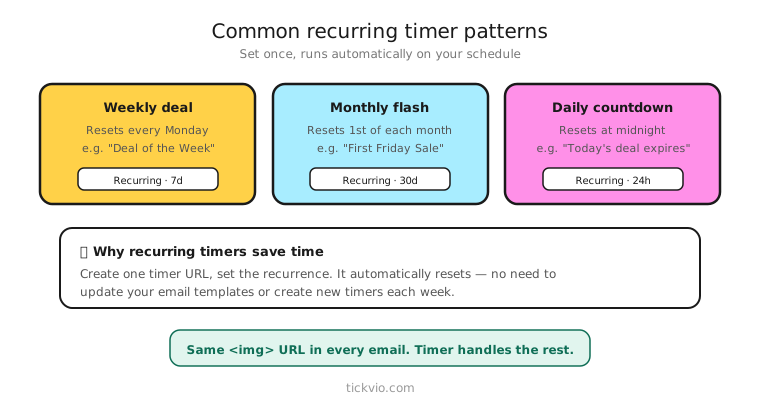
Create a recurring timer in Tickvio. Set the interval (weekly, bi-weekly, monthly, or custom), the day and time the countdown resets, and customise the design. The timer automatically counts down to the next occurrence, resets at the specified time, and starts counting again.
One URL works forever. Unlike fixed deadline timers where you need a new timer for each campaign, a recurring timer handles every cycle automatically. Embed it once in your template and it runs indefinitely.
Common recurring patterns
Weekly flash sales: "This week's deal ends in [TIMER]." Timer resets every Monday at midnight. Each week, subscribers see a fresh countdown to the next Monday cutoff. Food and beverage brands, fashion retailers, and e-commerce stores with rotating deals use this pattern heavily.
Monthly content drops: "Next issue releases in [TIMER]." Counts down to the 1st of each month (or whatever your publish date is). Ideal for publishers, newsletter creators, and content-driven brands.
Subscription box countdowns: "Your next box ships in [TIMER]." Builds anticipation between deliveries and reminds subscribers of the value they're getting. Subscription box brands use this to reduce churn by keeping subscribers excited between deliveries.
Recurring webinars: "Next session starts in [TIMER]." Resets after each event. Works for online education platforms with weekly classes, fitness brands with scheduled live workouts, and SaaS companies with regular product demos.
Bi-weekly promotions: "Next restock drops in [TIMER]." For brands with regular product restocks or limited-edition drops on a fixed schedule.
Why recurring timers save time (and reduce errors)
Without a recurring timer, each cycle requires: creating a new fixed timer, updating the deadline, regenerating the URL, swapping it in your email template, and testing. That's 15–20 minutes of manual work per cycle, and every touch point is an opportunity for error — wrong date, wrong timezone, forgotten URL swap.
Recurring timers eliminate all of this. Set it once, embed once, and every future cycle is automatic. For a weekly deal, that's 52 manual timer updates per year eliminated.
Copy frameworks for recurring urgency
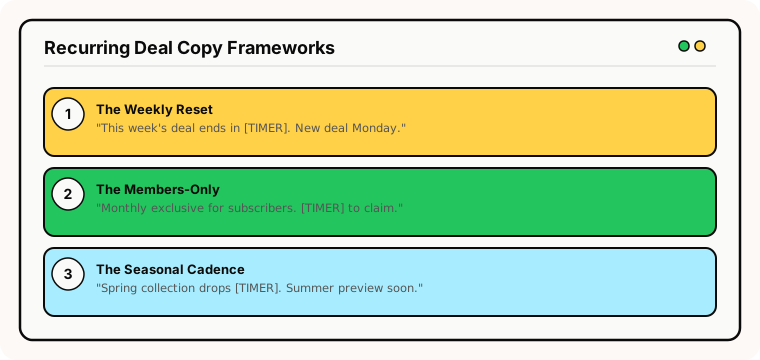
The "this week only" frame: "This week's featured deal: [Product] at 40% off. Ends in [TIMER]. A new deal drops every Monday." Clear, specific, trains subscribers to check every week.
The anticipation frame: "Your next box ships in [TIMER]. Here's a sneak peek of what's inside..." Urgency meets curiosity. Works particularly well for subscription boxes and content drops.
The regular schedule frame: "Our weekly flash deal resets in [TIMER]. This week: [Deal]. Next week: something even better." Creates a habit loop — subscribers learn to expect and look forward to the deadline.
Between-cycles expiry
What happens in the gap between one cycle ending and the next starting? Configure an expiry state for this window. Options include: "This week's deal has ended — the next one drops Monday" (with a secondary timer to the next cycle), a static "check back soon" message, or an automatic countdown to the next occurrence.
Tickvio's recurring timers handle the between-cycle period automatically — the timer switches to counting down to the next occurrence as soon as the current cycle ends.
Common mistakes
Every cycle gets a timer email. Even with recurring timers, you don't need to send a timer email every single cycle. If you run a weekly deal, sending a timer email 52 times a year will exhaust your list. Use the timer in 2–3 of your 4 weekly emails, or save it for the "last day" email only.
No variation in timer placement. If the timer is always in the same position in the same template, subscribers stop noticing it. Vary the placement — hero position for the launch email, companion position for the reminder, inline for the content email. See our design templates for layout options.
Not enforcing the deadline. Recurring timers still need enforcement. If the weekly deal is supposed to end Monday at midnight, it must actually end. Subscribers who discover the deal still works on Tuesday will never trust the timer again. Read our best practices on ethics.
Best practices
Follow all the same best practices as fixed and evergreen timers: place near the CTA, label clearly ("This week's deal ends in:"), configure expiry states, and monitor deliverability. The only difference is that recurring timers manage the deadline automatically.
Also ensure your landing page reflects the current cycle's deadline. If the timer says "Deal ends Friday," the product page should say the same.
What to measure
Week-over-week engagement trend: Are open rates and click rates holding steady, or declining? A downward trend signals fatigue.
Revenue per cycle: Compare revenue across cycles to identify which deals perform best.
Timer email vs non-timer email performance: Within the same cycle, do timer emails outperform non-timer emails?
Unsubscribe rate per cycle: A rising trend signals you're over-sending urgency. Use our measurement framework to set guardrails.
Industry fit
Recurring timers are especially valuable for subscription boxes, food and beverage (weekly specials), fitness (class schedules), online education (course cohorts), and e-commerce (rotating deals).
ESP setup
Embed the recurring timer URL once in your template. The timer handles all future cycles automatically. For platform-specific instructions, see our guides for Klaviyo, Mailchimp, ActiveCampaign, HubSpot, and all supported integrations.
Get started
Create a free recurring timer — set the schedule, customise the design, configure the between-cycle expiry, and embed once. It handles every future cycle automatically. No manual updates, no forgotten deadlines, no wasted time.