
Limited Editions and Workshop Seats Don't Last. Show That in Your Email.
Arts and crafts brands use Tickvio countdown timers to drive limited print sale windows, workshop registration deadlines, and seasonal supply drop urgency that converts creative subscribers before spots or stock run out.
Industry
- 48%
- Higher sell-through on limited edition prints when email shows a live countdown
- 42%
- Better workshop fill rate when registration close timer appears in email
- 67%
- Of art collectors act within 24 hours when a limited edition timer is visible
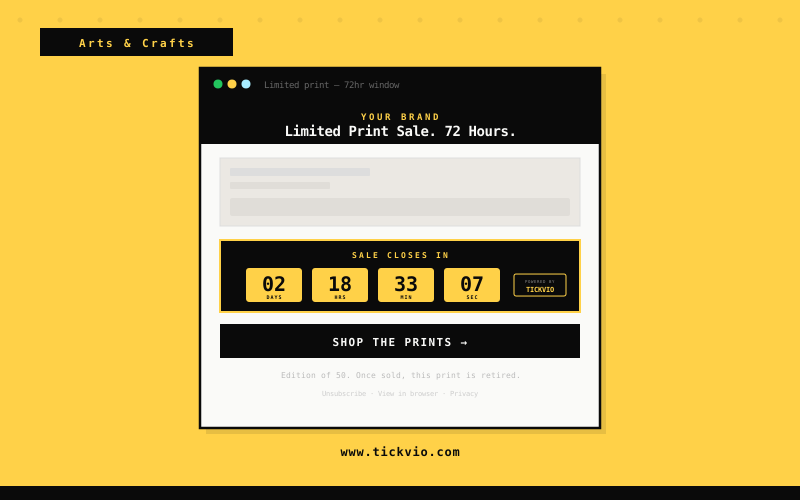
Arts & Crafts Email Subscribers Browse Without Buying When No Deadline Is in Sight
Arts and crafts audiences are passionate but rarely in a rush. Limited edition prints sit unsold, workshop spots fill slowly, and seasonal supply drops go unnoticed — all because there's no visible deadline pushing subscribers to act now rather than later.
Without a countdown timer, every 'limited time' claim in your email reads the same as every other marketing message. A live, ticking deadline is the difference between a subscriber thinking 'I'll check this later' and 'I need to grab this before it's gone.'
The fundamental issue is that text-based urgency has been devalued by overuse. Subscribers have seen 'limited time!' and 'ends soon!' so many times that the words carry no weight. A live countdown timer is materially different — it's a visual, animated proof point that the deadline is real, specific, and actively expiring as the subscriber watches. The timer doesn't make a claim about urgency; it demonstrates it.
How Arts & Crafts brands use timers
Limited Edition Print Sale Timers
Show a live countdown to when a limited edition print run closes. Subscribers see the hours and minutes ticking away — turning casual interest into committed purchases before the window shuts. For best results, place the timer directly above or below the main CTA button — creating a visual urgency signal that drives clicks at the moment of highest intent.
Workshop & Class Registration Deadlines
Embed a countdown to the exact moment workshop registration closes. When seats are limited and the timer is ticking, subscribers register immediately instead of bookmarking for later. The timer works especially well when the deadline is genuinely compressed (24–72 hours) and the subscriber understands that waiting has real consequences — lost availability, reverted pricing, or missed access.
Supply Drop Availability Windows
Run a timer alongside new supply drops — specialty papers, pigments, tools — that shows when the restock window closes. First-come urgency drives faster purchasing decisions from crafters. This use case is particularly effective because the deadline already exists in the business — the timer simply makes it visible in the email where the conversion decision happens.
Commission Order Close Dates
Display when commission intake closes for the quarter or season. Clients see the real deadline and submit their custom requests before the window passes, reducing last-minute enquiries. Subscribers who see a visible deadline on an offer they were already considering convert at significantly higher rates than those receiving open-ended promotional messaging.
Seasonal Collection Launch Countdowns
Build anticipation for seasonal collections with a countdown to launch day. Followers who see time running down to a release are far more likely to show up and purchase on day one. The combination of subscriber intent (they already showed interest) with a visible deadline (the timer) creates the highest-converting email moments in the category.
Patreon & Membership Join Windows
Use a timer to show when a membership tier, Patreon join bonus, or early-access window closes. Scarcity-driven membership offers convert significantly better when the deadline is visible and live. Flash and time-compressed campaigns with visible countdowns generate the majority of their conversions in the first 2–3 hours after send — making the timer placement and visibility critical for revenue maximisation.
Campaign ideas
| Campaign | What gets personalized | Impact |
|---|---|---|
| Limited Print Sale Closes | 72-hour timer on a numbered limited edition print release | AVG. +48% PRINT SELL-THROUGH |
| Workshop Registration Deadline | Live countdown to when workshop spots close for the next cohort | AVG. +42% WORKSHOP FILL RATE |
| Commission Orders Close | Timer to final day custom commissions are accepted this season | AVG. +36% COMMISSION BOOKINGS |
Timer templates
Proven layouts for Arts & Crafts — each drops into any ESP as a single image URL.
Your brand
Limited-time offer inside
Filled Boxes timer with green accent
bold, high-urgency layout for limited print sale closes campaigns.
Your brand
Limited-time offer inside
Flip Clock timer with yellow accent
premium aesthetic for workshop registration deadline campaigns.
Your brand
Limited-time offer inside
Pill timer with blue accent
compact, clean layout for commission order close campaigns.
Art buyers understand scarcity instinctively — limited edition prints and workshop seats are genuinely scarce, and a visible deadline makes that scarcity undeniable. Tickvio countdown timers give artists, galleries, and craft brands a tool to communicate exactly when a print window closes, when workshop registration fills, or when commission intake ends for the season. Collectors who see a real deadline act within 24 hours.
Tickvio's timer renders as an animated GIF that works in Gmail, Apple Mail, Yahoo, Outlook (static fallback), and every major mobile email client. No JavaScript, no iframes, no compatibility concerns. The timer updates on every open, showing the accurate remaining time whether the subscriber opens the email five minutes or five days after send. For brands using Klaviyo, Mailchimp, Omnisend, ActiveCampaign, or any other ESP — the embed is a single line of HTML that drops into any template.
Explore how other industries use Tickvio countdown timers: Music & Instruments, Garden & Plants, and CBD & Cannabis. Or get started with your first timer in under five minutes — see a live demo to preview how it looks in your email.
Mailchimp · Kit · Flodesk · Squarespace Email · Brevo · ActiveCampaign · Campaign Monitor · Klaviyo · Drip · SendGrid
First name · Collector tier · Last purchase · Workshop registration status · Commission slot reference · Edition number · Membership level
Frequently asked questions
Can I use a countdown timer for a truly open-edition print with a limited time window?
Will timers work in emails sent from platforms like Squarespace, Shopify, or Etsy Shop?
Can I use countdown timers for workshop registration across multiple date options?
Can timers help with commission intake management?
Ready to add urgency
to every send?
Your first timer takes less time than reading this sentence. Free plan. No credit card. No kidding.
Free plan includes 20,000 views/mo · No credit card required