
Seasonal promotions come with a built-in advantage: real deadlines. Black Friday ends. Summer clearance has a final day. Back-to-school pricing expires. A countdown timer transforms these calendar-based deadlines from abstract concepts into ticking clocks that drive action.
And the stakes are high. According to Omnisend's 2025 benchmarks, November 2024 was a record-breaking period for holiday shopping, with email click-to-conversion rates jumping 53% year-over-year. Automated emails — including those with countdown timers — accounted for just 2% of email volume but drove 30% of revenue, earning 16× more per send than scheduled campaigns.
How it works
Use a fixed deadline timer set to the exact end of your seasonal promotion. One timer URL works across every email in the campaign — the countdown updates automatically each time a subscriber opens.
The timer is a server-rendered animated GIF that works in every email client supporting images. No JavaScript, no special ESP features needed. For the technical details, see our complete countdown timer guide.
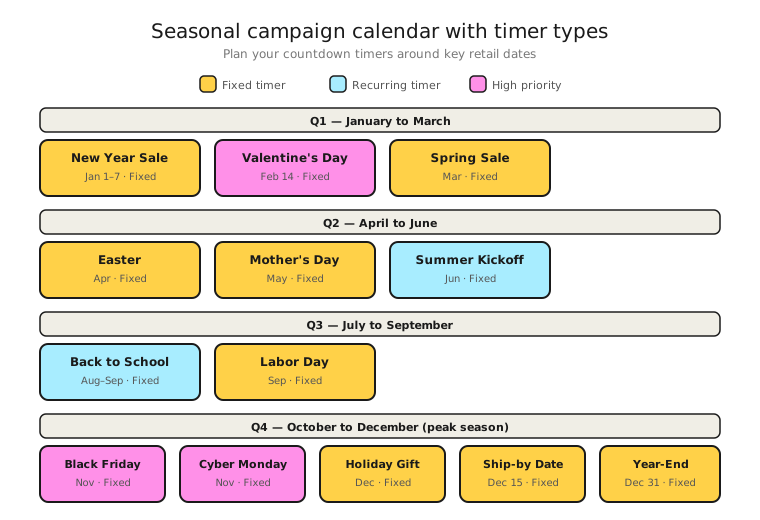
Seasonal campaign calendar
Plan your timer campaigns around natural retail moments throughout the year:
Q1: New Year sales, Valentine's Day, winter clearance. Q2: Spring sales, Mother's Day, Father's Day, end-of-spring clearance. Q3: Summer sales, back-to-school, Labour Day. Q4: Halloween, Black Friday, Cyber Monday, holiday gifting, year-end clearance.
Each of these has a genuine deadline that justifies a countdown. The key is that the deadline is real — the sale actually ends when the timer says it does.
Multi-email seasonal sequences
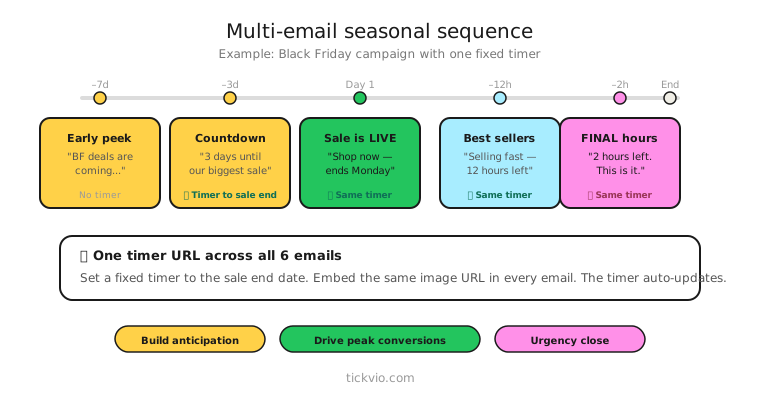
Seasonal campaigns often span multiple emails. Follow the flash sale flow structure: build anticipation early without a timer, introduce the timer at launch, and escalate urgency as the deadline approaches.
Week before: Announcement email. No timer. "Our biggest sale of the year starts Friday." Build anticipation.
Day of launch: Sale is live. Timer in hero position showing the full countdown window. "Summer sale ends Sunday at midnight. [TIMER]"
Mid-sale: Best-sellers, curated picks. Timer in companion position near the CTA. The products are the focus; the timer adds background urgency.
Final day: Timer back in hero position. Copy shifts to "last chance." This is where the highest conversion rates happen — Omnisend data shows automated urgency emails generate $2.87 per email compared to $0.18 for standard campaigns.
Post-season: No timer. Wrap-up email. "The sale has ended — here's what sold out" or "Sign up to be first for our next event."
Copy frameworks for seasonal urgency
The countdown-to-savings frame: "Our summer sale ends in [TIMER]. After that, everything returns to full price. No extensions."
The seasonal FOMO frame: "Last year, our Black Friday sale sold out in 18 hours. This year's timer is already ticking: [TIMER]."
The gift deadline frame: "Order by [TIMER] for guaranteed Christmas delivery. After that, we can't promise it'll arrive in time." Pairs financial urgency with emotional urgency.
Post-season expiry
When the season ends, configure an expiry state that's forward-looking rather than dead-end: "This sale has ended — sign up to be first for our next seasonal event" keeps the subscriber engaged rather than frustrated. Tickvio's auto-expire feature handles this automatically.
Deliverability during peak season
High-volume seasonal sends put extra pressure on sender reputation. According to Litmus research, 1 in 6 marketing emails never reach the inbox during peak periods. Follow our deliverability guidelines and don't put timers in every email of a long seasonal sequence — timer fatigue is real.
Landing page consistency
Your email timer says "18 hours left." The subscriber clicks through. If the landing page shows a different deadline or no timer at all, trust breaks immediately. Ensure email and landing page timers count down to the same moment.
Common mistakes
"Extended!" after the timer expires. This is the single most damaging thing you can do for long-term timer credibility. If subscribers learn that your seasonal deadlines are fake, no future timer will motivate action. Read our ethics and best practices guide.
Timer in every email of a 10-email sequence. Subscribers will tune out. Use timers in 3–4 strategically placed emails, not every send.
Starting the timer too early. A timer showing "14 days 6 hours" doesn't create urgency — it creates the opposite. Wait until the sale is live or within 7 days of ending to introduce the countdown.
What to measure
Revenue per email (RPE): Compare timer emails to non-timer emails in the same seasonal sequence. The gap tells you the timer's incremental value.
Conversion rate by email position: Typically, the "last chance" and "final hour" timer emails have the highest conversion rates. Confirm this in your data.
Unsubscribe rate: If seasonal timer campaigns have meaningfully higher unsubscribe rates, you're overusing urgency or the offers aren't compelling enough without it.
Year-over-year comparison: Are your timer-enhanced seasonal campaigns improving over time, or is fatigue setting in?
For the complete measurement framework, see our analytics and A/B testing guide.
Industry fit
Seasonal timers work for virtually every consumer-facing industry: e-commerce, fashion, home and furniture, food and beverage, travel and hospitality, beauty, electronics, and health and wellness.
ESP setup
Seasonal timers work with every major email platform. For step-by-step embed instructions, see our guides for Klaviyo, Mailchimp, ActiveCampaign, HubSpot, and 50+ more ESPs.
Get started
Create a free seasonal timer — set the deadline, match your campaign's brand colours, configure the expiry state, and embed in your seasonal email sequence. One timer URL works across every email in the campaign. No credit card required.