
Discount codes without visible deadlines get saved, forgotten, and ignored. According to OptinMonster research, 59% of consumers say marketing emails influence their purchase decisions — but only when the incentive feels timely and relevant. A discount code sitting in an inbox for two weeks has lost its urgency entirely.
A countdown timer on the code's expiry transforms it from a passive incentive into a ticking reason to purchase now. "Your 20% discount expires in 48 hours" with a live countdown is fundamentally different from "Use code SAVE20" with no visible deadline — the timer makes the consequence of inaction immediate and visual.
This guide covers how to structure discount expiry timer campaigns, the critical role of enforcement, and how to avoid creating discount dependency. It builds on our complete countdown timer guide and best practices.
How it works
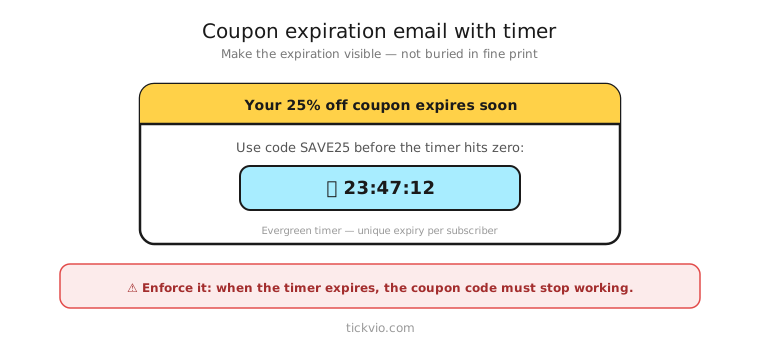
Use an evergreen timer for personalised discount codes that expire on a per-recipient schedule (e.g., 48 hours after the code is issued). Use a fixed deadline timer for shared promotional codes that expire at a specific date and time (e.g., "SUMMER20 expires Sunday at midnight").
Tickvio's evergreen timer feature creates per-recipient deadlines automatically — each subscriber's timer starts when they receive the discount, not on a shared calendar date.
Email structure for discount expiry
A discount expiry campaign typically spans two to three emails, timed around the code's validity window:
Email 1: Code delivery + timer. "Here's your exclusive 20% discount: SAVE20. It expires in: [TIMER]." Deliver the code, show the timer near the CTA, and make the deadline explicit. Don't bury the code — it should be visually prominent alongside the countdown.
Email 2: Reminder (midway through the window). "Your discount code expires in [TIMER]. Here's what customers are buying this week." Pair the shrinking timer with product recommendations or social proof to give the subscriber a reason to browse.
Email 3: Last chance (final hours). "Your 20% discount expires tonight. [TIMER]" Minimal copy, maximum urgency. Timer in hero position. This email typically drives the highest conversion rate in the sequence.
Post-expiry: No timer. "Your discount has expired — browse our latest arrivals at regular pricing." Shift to value-based content, not another discount.
Copy frameworks
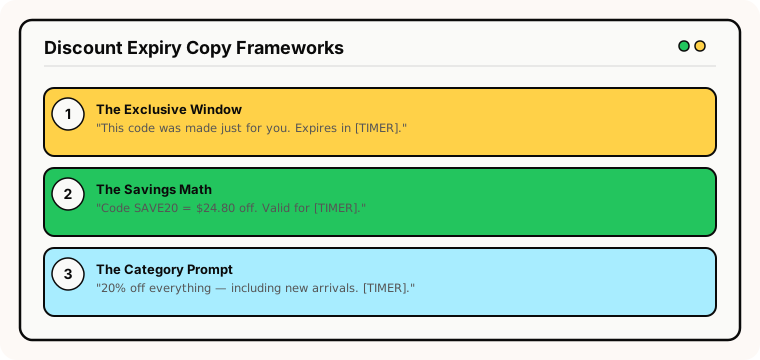
The "exclusive window" frame: "This code was generated just for you. It expires in [TIMER] — after that, it's gone permanently." Personalisation plus finality.
The "savings math" frame: "Code SAVE20 = $24.80 off your cart. Valid for [TIMER]. After that, full price." Quantify the savings to make inaction feel costly.
The "category prompt" frame: "20% off everything — including new arrivals. Your code expires in [TIMER]. Here are 5 items worth a look." Combine the deadline with product discovery.
Enforcement: the make-or-break detail
This is the single most important aspect of discount expiry timers. The code must stop working at the exact moment the timer hits zero.
If the code still works a day later, you've taught the subscriber that your deadlines are theatrical. According to Omnisend's 2025 benchmarks, automated emails earn $2.87 per email — but that ROI depends on subscribers believing the urgency is real. Fake discount deadlines erode trust faster than any other timer misuse.
Implementation checklist: use auto-expiring unique codes if your platform supports them, test the code after the deadline to verify it returns an error, configure a clear expiry state so late openers see "Your discount has expired" instead of a frozen 00:00:00, and ensure the landing page reflects the ended offer.
See our complete enforcement checklist for the full implementation guide.
Avoiding discount dependency
The risk with discount timers is creating a pattern where subscribers only buy when they have a code. This is the same discount dependency trap that affects cart abandonment flows.
Limit frequency: Don't send discount codes with timers more than once per quarter to the same subscriber. Space them out so the offer feels special, not routine.
Vary the incentive: Alternate between percentage discounts, free shipping, gifts-with-purchase, and early access. This prevents subscribers from learning "wait long enough and a 20% code arrives."
Segment by purchase history: Reserve discount timers for first-time buyers and lapsed customers. Repeat buyers who purchase at full price don't need discount urgency — and giving it to them trains them to wait.
Common mistakes
Discount code that never expires. The most common and most damaging mistake. If the code works indefinitely, every future timer is meaningless.
Same discount, same timer, every month. Subscribers learn the pattern. The "exclusive" 20% code loses all urgency when it arrives like clockwork every 30 days.
No clear code display. The discount code should be visually prominent — large text, contrasting background — alongside the timer and CTA. Don't make subscribers hunt for it.
Timer without the code. A timer that says "Your offer expires in [TIMER]" but doesn't show the actual discount code or what the discount is creates confusion, not urgency.
What to measure
Code redemption rate: What percentage of subscribers use the discount code within the timer window? Compare timer vs no-timer cohorts.
Revenue per discount email: Track total revenue generated, not just discount usage. A 20% discount that generates $10,000 in revenue is worth $8,000 after the discount.
Code usage after expiry: The enforcement audit. If codes are used after the timer hits zero, your expiration logic has a gap.
Full-price purchase rate over 90 days: The long-term health metric. If declining, discount timers may be conditioning subscribers to wait for codes.
For the complete measurement framework, see our analytics and A/B testing guide.
Industry fit
Discount expiry timers work across e-commerce, fashion, beauty, food and beverage, health and wellness, SaaS (upgrade discount codes), and online education (enrolment discounts). They're particularly effective for any business that issues personalised promotional codes.
ESP setup
Discount expiry timers work within any ESP's automation builder. For platform-specific instructions, see our guides for Klaviyo, Mailchimp, ActiveCampaign, HubSpot, and all supported integrations.
Get started
Create a free evergreen timer for your discount campaigns. Set the expiry window, customise the design, configure the post-expiry state, and embed in your promotional automation. Each recipient gets their own personal code deadline. No credit card required.