
Membership expirations, loyalty tier deadlines, and annual renewal dates are genuine time constraints — but they're easy to forget. A countdown timer in your renewal emails makes the deadline tangible and the consequence of inaction clear.
Churn is expensive. According to industry benchmarks, acquiring a new customer costs 5–7× more than retaining an existing one. For subscription businesses, reducing churn by just 5% can increase profits by 25–95%. A visible countdown timer in renewal emails turns passive expiry — where members forget and drift away — into an active decision point where they consciously choose to renew or leave.
How it works
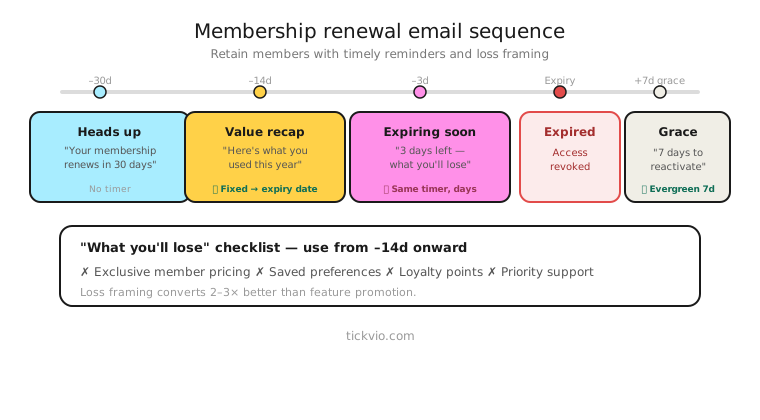
Use an evergreen timer tied to each member's renewal or expiry date. The timer is personalised — it shows how much time that specific member has before their plan expires, their loyalty points reset, or their locked-in rate increases.
Tickvio's evergreen timer feature handles this automatically. Set the countdown window to match each member's billing cycle, and the timer calculates the personal deadline from their renewal date.
Renewal email sequence
Start early. Members who only hear about their renewal on expiry day have already mentally moved on. Here's a proven escalation structure:
30 days before expiry (no timer). Informational reminder. "Your [Plan Name] renews on [date]. Here's what you've accomplished this year." Focus on value delivered, not urgency.
14 days before (introduce the timer). "Your plan expires in [TIMER]. Renew now to keep all your benefits." First appearance of the countdown. Timer in companion position near the renewal CTA.
7 days before (timer in prominent position). Escalated urgency. "One week left on your [Plan Name]. Here's what you'll lose if you don't renew: [specific features, data, loyalty points]." Timer near hero position.
3 days before (urgency push). "Your plan expires in [TIMER]. After that, your [data/points/rate] will be [reset/archived/increased]." Minimal copy, maximum specificity about consequences.
Day of (final call). "Your [Plan Name] expires today. [TIMER]" The timer shows hours. Last chance framing.
Post-expiry (no timer). "Your membership has expired. Renew now to restore access to [specific benefits]." This is where your expiry state and post-lapse re-engagement matters.
"What you'll lose" messaging
The timer alone doesn't renew memberships. Pair it with clear, specific consequences of inaction. The more concrete and personal, the better:
Feature loss: "When your plan expires, you'll lose access to [analytics dashboard / priority support / team features]. Renew in [TIMER] to keep them."
Data and progress: "You've tracked 247 workouts this year. Your history will be archived when your membership expires in [TIMER]. Renew to keep your streak."
Financial: "You're locked in at $9/month. If your plan expires, the current price is $14/month. Renew in [TIMER] to keep your rate." This is one of the strongest renewal motivators — loss of a locked-in price.
Loyalty points: "You have 12,400 points ($124 value). Points expire when your membership lapses. Renew in [TIMER] to keep them."
Grace periods
Many membership businesses offer a grace period after expiry — 7 to 30 days where the account is suspended but data is preserved. If you use grace periods, the post-expiry email can include a second timer: "Your data will be permanently deleted in [TIMER]. Renew now to restore your account."
This creates a second urgency window with even higher stakes (permanent data loss vs temporary feature loss).
Common mistakes
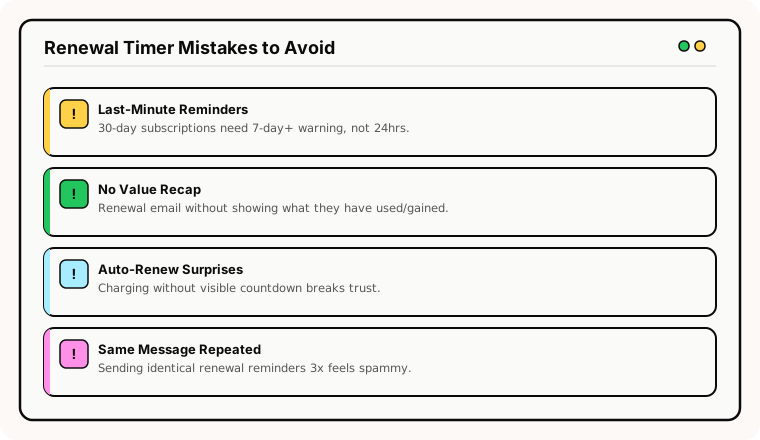
Only emailing on the last day. By expiry day, many members have already decided to leave. Start the sequence 30 days out to give them time to re-evaluate and renew before the deadline pressure begins.
Generic renewal messaging. "Your membership is expiring" doesn't motivate action. Specifics do: what they've used, what they'll lose, what will change about their pricing.
No grace period communication. If you offer a grace period but don't communicate it, members who would have renewed within those extra days won't know the option exists.
Pushy frequency. Five renewal emails in two weeks feels aggressive. Space them appropriately: 30 days, 14 days, 7 days, 3 days, day-of is a maximum cadence.
Industry fit
Renewal timers work for SaaS and software (annual plan renewals), subscription boxes (quarterly or annual commitments), fitness and gym memberships (annual memberships), insurance (policy renewals), nonprofit memberships (annual donor renewals), and education platforms (annual subscriptions).
What to measure
Renewal rate: Compare timer cohort vs no-timer cohort over at least one full billing cycle.
Renewal timing: Do more renewals happen during the 14-day countdown period? If yes, the timer is accelerating the decision.
Voluntary churn rate: The ultimate metric. Is the timer reducing the number of members who let their subscription lapse?
Grace period recovery rate: If you use grace periods, what percentage of lapsed members renew during the grace window? A second timer here can improve this metric.
For the complete measurement framework, see our analytics and A/B testing guide.
ESP setup
Renewal timers work within any ESP or marketing automation platform that can trigger flows based on subscription dates. For platform-specific instructions, see our guides for Klaviyo, Mailchimp, ActiveCampaign, HubSpot, and all supported integrations.
Get started
Create a free evergreen timer for your renewal flow. Match the window to your billing cycle, configure the expiry state, and embed in your retention automation. Each member gets their own personal renewal countdown — turning passive churn into an active decision.