
Re-engagement campaigns target subscribers who've stopped opening, clicking, or buying. These are people who once showed interest but have gone quiet. According to Omeda's engagement research, only 33% of any email list's total known audience actively engaged in the last 12 months — meaning two-thirds of most lists are dormant.
A countdown timer adds a dimension that static "we miss you" emails lack: a finite window to act. "Here's 20% off, but only for the next 72 hours" with a ticking clock is fundamentally different from the same offer without a deadline.
How it works
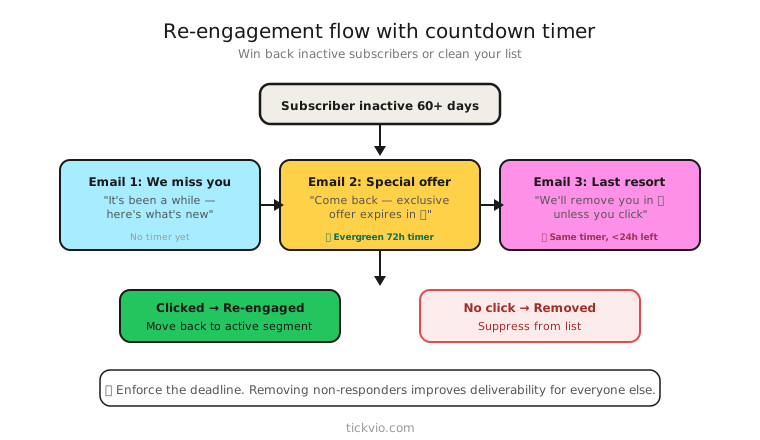
Use an evergreen timer so each subscriber gets their own re-engagement window. The 72-hour countdown starts from when that specific subscriber enters the re-engagement flow — not from a shared calendar date.
This is important because dormant subscribers re-enter engagement at unpredictable times. An evergreen timer ensures every subscriber gets the full window regardless of when they're processed by your automation.
Tickvio's evergreen timer feature handles this automatically. Set the window (48, 72 hours, or 7 days) and each subscriber gets their own personal countdown.
Re-engagement flow structure
A timer-enhanced re-engagement flow typically has three emails:
Email 1: "We miss you" + offer + timer. Lead with value, not guilt. "We haven't seen you in a while — here's 20% off your next order. Your exclusive window: [TIMER]." The offer must be genuinely compelling, and the timer makes it finite.
Email 2: "Time is running out" reminder. Same timer, now showing less time. "You have [TIMER] left to use your 20% discount. After that, it's gone." This email catches subscribers who saw Email 1 but didn't act. The shrinking timer creates natural escalation.
Email 3: Post-expiry (no timer). "Your exclusive offer has expired, but here's what you've been missing." Shift to content — new products, best sellers, brand updates. This email exists for people the timer didn't convert, so a different angle is needed.
Follow best practices for timer placement — near the CTA, clearly labelled, with a specific consequence for inaction.
Copy examples
The direct re-engagement: "It's been 90 days since your last purchase. We'd love to have you back — here's 20% off, valid for the next 72 hours. [TIMER]"
The "what you're missing" frame: "Since you've been away, we've launched 12 new products. Come back and explore — plus, here's a personal 15% off that expires in [TIMER]."
The no-discount approach: "We've saved your preferences and wishlist. Your reserved cart expires in [TIMER] — come back and pick up where you left off." Urgency without discounting.
Enforcement is everything
If the discount code works forever, the timer was a lie — and you've reinforced the subscriber's decision to ignore your emails. The code must expire when the timer hits zero.
This is especially important for re-engagement because these subscribers already have a pattern of not engaging. Giving them a reason to believe your deadlines are fake will make future re-engagement even harder. See our enforcement checklist for implementation details.
Configure a proper expiry state so subscribers who open after the deadline see something helpful rather than a frozen timer.
Segment carefully
Don't send re-engagement timers to your entire list. Target subscribers who meet specific criteria:
Previously engaged but now dormant: Opened or clicked within the last 6–12 months, but inactive for the last 60–90 days. These are recoverable — they know your brand and chose to subscribe.
Exclude recent purchasers: Someone who bought last week doesn't need a win-back email. Set a minimum inactivity threshold.
Exclude never-engaged: Subscribers who never opened a single email are unlikely to respond to a timer. Consider removing them entirely for deliverability health.
The "last resort" before list cleaning
Many marketers use re-engagement campaigns as a final step before removing inactive subscribers. The timer adds genuine finality: "We'll remove you from our list in [TIMER] unless you'd like to stay. Click here to keep your subscription." This is honest, clear, and lets the subscriber make a conscious choice.
What to measure
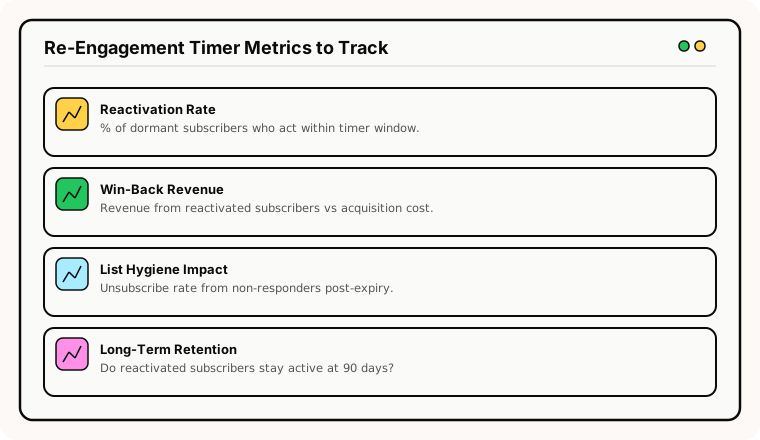
Reactivation rate: What percentage of dormant subscribers return to active engagement within 30 days of the re-engagement flow?
Revenue per reactivated subscriber: Are re-engaged subscribers actually purchasing, or did they just click once?
Long-term retention: Do re-engaged subscribers stay active for 90+ days, or do they lapse again quickly?
Spam complaint rate: Re-engagement emails to dormant subscribers carry higher spam complaint risk. Monitor this closely. If complaints spike, narrow your segments.
According to Omnisend's data, automated emails (including re-engagement flows) generate 320% more revenue than non-automated emails. But the ROI depends entirely on targeting the right segments.
For the complete measurement framework, see our analytics and A/B testing guide.
Industry applications
Re-engagement timers work for e-commerce (lapsed buyers), SaaS (churned or inactive users), subscription boxes (cancelled subscribers), online education (inactive students), and health and wellness (lapsed members).
ESP setup
Re-engagement timers work within any ESP's automation/flow builder. Trigger the flow based on inactivity criteria (e.g., no opens or clicks in 90 days). For platform-specific instructions, see our guides for Klaviyo, Mailchimp, ActiveCampaign, HubSpot, and all supported integrations.
Get started
Create a free evergreen timer for your win-back flow. Set a 48 or 72-hour window, configure the expiry state, and embed in your re-engagement automation. Each dormant subscriber gets their own personal deadline to return.