
Pre-orders create a commitment before a product is available — but without a visible closing window, that commitment feels indefinite. A countdown timer transforms "pre-order now" into "pre-order closes in 3 days 08:14:22," giving subscribers a concrete reason to commit today rather than waiting.
Pre-order timers are especially credible because the deadline is real — production, shipping, or allocation deadlines impose genuine constraints. According to Omnisend's 2025 data, automated emails generate 16× more revenue per send than standard campaigns. A pre-order flow with a visible countdown amplifies this by combining product anticipation with deadline urgency.
This guide covers how to structure pre-order timer campaigns, the email sequence that converts interest into commitments, and the credibility rules that keep pre-order urgency trustworthy. It builds on our complete countdown timer guide.
How it works
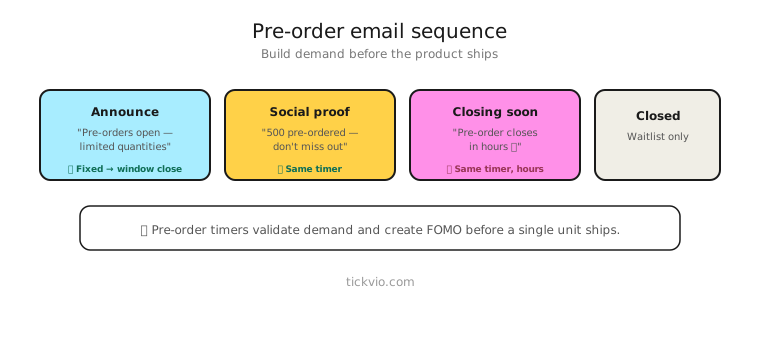
Use a fixed deadline timer counting down to when the pre-order window closes. Everyone shares the same deadline — the production cutoff, the allocation limit date, or the pricing lock date.
For pre-orders with limited quantities, combine the timer with stock messaging: "Pre-order window closes in [TIMER] — only 200 units allocated." The timer handles time scarcity while the quantity messaging handles supply scarcity.
Pre-order email sequence
Email 1: Pre-order launch. "[Product] is available for pre-order. Guaranteed delivery by [date]. Pre-order window closes in: [TIMER]." Timer in companion position. The product is the hero; the timer adds the deadline.
Email 2: Why pre-order (midway). "Pre-order benefits: guaranteed allocation, launch-day delivery, exclusive pricing. Window closes in [TIMER]." Focus on what the subscriber gains by pre-ordering vs waiting for general availability.
Email 3: Progress update. "[X]% of pre-order allocation sold. Window closes in [TIMER]." Social proof combined with the shrinking timer.
Email 4: Last chance (final hours). "Pre-order closes tonight. After [TIMER], wait for general availability — no guaranteed delivery date." Timer in hero position. Emphasise what changes when the window closes.
Email 5: Window closed (post-deadline). No timer. "Pre-orders are closed. Join the waitlist for general availability." Confirms the deadline was real.
Pre-order incentive structures
Price lock: "Pre-order at $X. After [TIMER], the price increases to $Y." The same mechanism as early-bird pricing but tied to a product release.
Guaranteed delivery: "Pre-order before [TIMER] for guaranteed launch-day delivery." No price discount — the incentive is timing, not savings.
Exclusive variant: "Pre-order includes an exclusive [colour/edition/accessory] not available after [TIMER]." Creates collector appeal alongside the deadline.
Bundle bonus: "Pre-order before [TIMER] and receive [bonus item] free with your order." The bonus disappears with the timer.
Copy frameworks
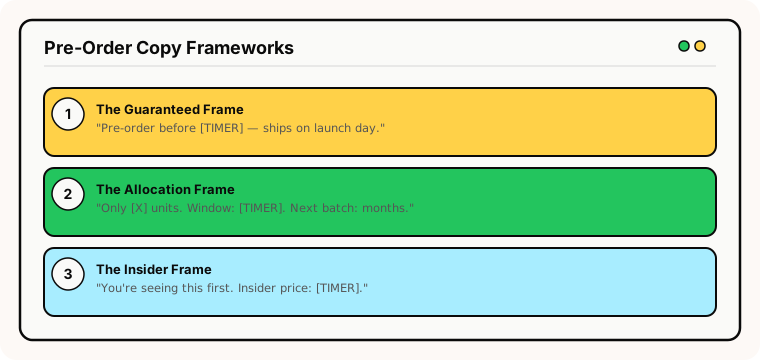
The "guaranteed" frame: "Pre-order before [TIMER] and yours ships on launch day. After that, delivery is first-come-first-served." The guarantee is the incentive.
The "allocation" frame: "Only [X] units in this production run. Pre-order window: [TIMER]. Once closed, the next batch is [months] away." Combines time and supply scarcity.
The "insider" frame: "You're seeing this before it goes public. Pre-order at the insider price before [TIMER]." Makes the subscriber feel privileged.
Common mistakes
Pre-order window that never closes. If the "pre-order" is available indefinitely and the timer just resets, it's not a pre-order — it's regular commerce with misleading framing.
No delivery timeline. Pre-order subscribers need to know when they'll receive the product. A timer without a ship date creates anxiety, not urgency.
Overselling the allocation. If you take 500 pre-orders but only have 200 units in the first batch, you've created a fulfilment problem. Be honest about quantities.
What to measure
Pre-order conversion rate: What percentage of email recipients pre-order within the timer window?
Pre-order vs general availability sales: Do pre-orders cannibalise future sales, or do they represent incremental revenue?
Cancellation rate: If pre-order cancellations are high, the timer may be pressuring people into premature commitments they later regret.
For the complete measurement framework, see our analytics and A/B testing guide.
Industry fit
Pre-order timers work for consumer electronics (product launches), gaming (game and console pre-orders), fashion (seasonal collection pre-orders), food and beverage (seasonal batch pre-orders), publishing (book pre-orders), and any business launching a product with limited initial supply.
ESP setup
Pre-order timers work with every major email platform. For step-by-step instructions, see our guides for Klaviyo, Mailchimp, ActiveCampaign, HubSpot, and all supported integrations.
Get started
Create a free pre-order countdown timer — set the window close date, customise the design, configure the expiry state, and embed across your launch sequence. No credit card required.