
Early-bird pricing works because it rewards decisive action with a tangible benefit — a lower price that disappears at a specific moment. A countdown timer makes that moment visible, transforming "early-bird pricing available" into "early-bird pricing ends in 2 days 14:22:08."
The psychology is straightforward: people procrastinate, even when they intend to buy. According to Omnisend's 2025 benchmarks, automated emails generate $2.87 per email — 16× more than standard campaigns. An early-bird timer in an automated launch sequence captures the highest-intent subscribers before they drift away.
This guide covers how to structure early-bird timer campaigns for events, courses, memberships, and SaaS pricing — any scenario where you offer a time-limited discount for early commitment. It builds on our complete countdown timer guide.
How it works
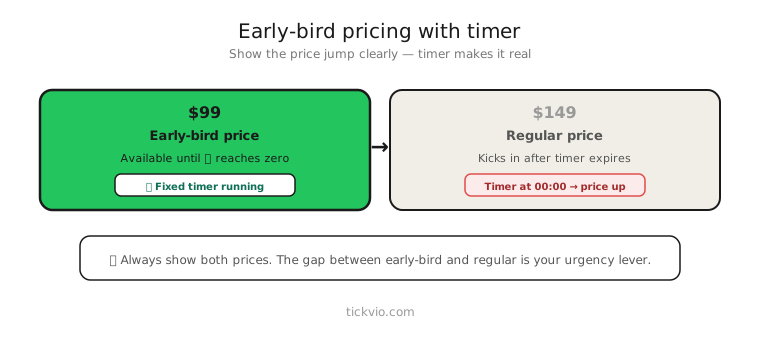
Use a fixed deadline timer counting down to when early-bird pricing expires and regular pricing begins. Everyone shares the same cutoff — the transition from early to regular pricing happens at a single, public moment.
Tickvio's fixed deadline timer counts down to the exact moment pricing changes. One timer URL across all emails in the sequence — the countdown updates automatically on each open.
Why early-bird timers convert
Early-bird offers combine two motivators: savings (the price difference) and loss aversion (the deadline). A countdown timer makes the loss aversion concrete — subscribers can literally watch their savings evaporating in real time.
The price difference itself creates the urgency rationale. "Save $50 before [TIMER]" is more credible than "Buy now before it's too late" because the subscriber knows exactly what they're losing and when they're losing it.
Early-bird email sequence
Email 1: Announcement + early-bird window opens. "Introducing [Product/Event/Course]. Early-bird pricing: $X (regular: $Y). Ends in: [TIMER]." Lead with the value proposition, then anchor the savings with the timer. Don't lead with the deadline — lead with what they're getting.
Email 2: Value deep-dive (midway through the window). "Here's what you get at the early-bird price." Focus on features, speakers, curriculum, or outcomes. Timer in companion position — not the hero, but visible. This email builds desire for subscribers who need more information before committing.
Email 3: Social proof + price comparison (48 hours before cutoff). "237 people have already locked in early-bird pricing. [TIMER] until the price goes up." Combine the shrinking timer with social proof to create dual urgency — other people are buying, and time is running out.
Email 4: Last chance (final hours). "Early-bird pricing ends tonight. After [TIMER], the price goes from $X to $Y." Timer in hero position. Quantify the exact dollar amount they'll lose. This is typically the highest-converting email in the sequence.
Email 5: Price has changed (post-deadline). No timer. "Early-bird pricing has ended. [Product/Event] is now $Y." This email confirms the deadline was real and serves subscribers who are willing to pay full price. It also builds credibility for the next early-bird campaign.
Copy frameworks
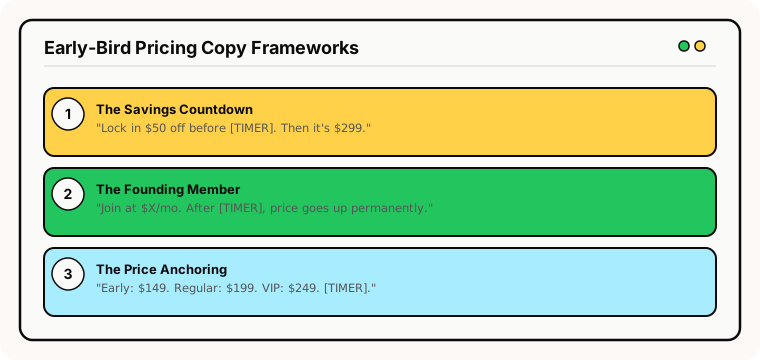
The "savings countdown" frame: "Lock in $50 off before [TIMER]. After that, the price goes to $299 — no exceptions." Specific savings, specific deadline, specific consequence.
The "founding member" frame: "Join as a founding member at $X/month. After [TIMER], the price increases to $Y/month — permanently." Works well for memberships and subscriptions where early pricing locks in forever.
The "price anchoring" frame: "Early-bird: $149. Regular: $199. VIP (after launch): $249. Current price expires in [TIMER]." Show the full price ladder to make the early-bird savings feel even more significant.
Common mistakes
"Extended" early-bird pricing. The most trust-damaging mistake. If early-bird pricing was supposed to end Friday and you extend it to Sunday, every subscriber who bought on Thursday feels cheated — and every subscriber who waited learns that your deadlines are soft. Never extend.
No visible price change. After the timer hits zero, the price on your landing page must actually change. If it's still showing the early-bird price after the deadline, the timer was a lie.
Too many pricing tiers. "Super early-bird," "early-bird," "regular," and "late" pricing creates confusion. Two tiers (early-bird and regular) with one clear timer is the cleanest approach.
Timer without price comparison. Showing "[TIMER] remaining" without displaying the current vs future price removes the motivation. Always show both prices alongside the countdown.
What to measure
Early-bird conversion rate: What percentage of total sales happen during the early-bird window? If it's over 80%, your regular pricing may be too high — or the early-bird window is too long.
Revenue per early-bird email: Which email in the sequence drives the most revenue? Typically Email 4 (last chance).
Post-deadline purchase rate: Do people still buy after the early-bird window closes? This validates that your regular pricing is also viable.
Campaign-over-campaign comparison: Does the early-bird conversion rate improve or decline across successive launches? Declining rates suggest subscribers are learning to ignore the deadlines.
For the complete measurement framework, see our analytics and A/B testing guide.
Industry fit
Early-bird timers work for online courses and education (course enrolment windows), events and conferences (ticket pricing tiers), SaaS (launch pricing, annual plan discounts), fitness and gyms (founding member rates), subscription boxes (launch pricing), and membership organisations (early renewal discounts).
ESP setup
Early-bird timers work with every major email platform. For step-by-step instructions, see our guides for Klaviyo, Mailchimp, ActiveCampaign, HubSpot, and all supported integrations.
Get started
Create a free early-bird countdown timer — set the pricing cutoff, customise the design, configure the expiry state, and embed across your launch sequence. One timer URL, every email in the campaign. No credit card required.