
The moment after a purchase is one of the highest-trust points in the customer journey. The buyer just committed money — they're engaged, they trust your brand, and they're primed for a relevant add-on. A countdown timer on a post-purchase upsell creates a personal window to act on that momentum.
And the numbers support it. According to Omnisend's 2025 research, automated emails like post-purchase sequences generate $2.87 per email compared to $0.18 for standard campaigns — a 16× difference. Welcome and post-purchase flows were among the highest-revenue automation types, with birthday messages producing an average order value of $744, more than 4× the standard.
How it works
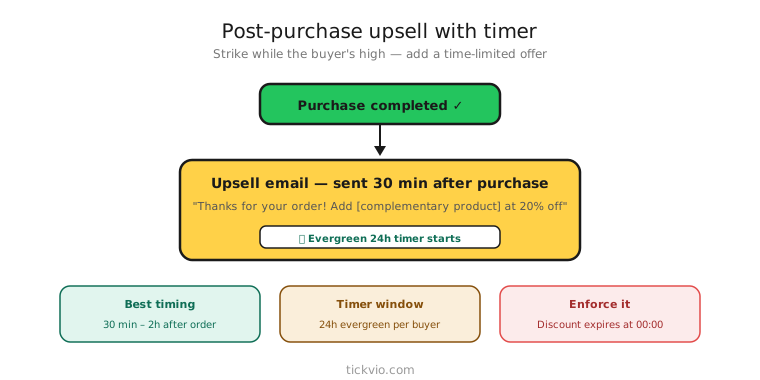
Use an evergreen timer triggered by the purchase event. "Add this accessory at 25% off within the next 24 hours" — the 24 hours starts from when that specific customer completed checkout. Each buyer gets their own window.
Tickvio's evergreen timer feature makes this straightforward. Set the window (12, 24, or 48 hours), configure the expiry state, and embed the timer URL in your post-purchase automation email. The timer calculates each buyer's personal deadline automatically.
Email structure
A post-purchase upsell email should be simple and focused. The buyer already trusts you — don't overcomplicate the message:
Order context: "Thanks for your order of [Product]." Acknowledgement builds continuity.
Complementary offer: "Complete your setup with [Accessory] — 25% off for the next 24 hours." The offer must be genuinely relevant to what they just bought.
Countdown timer: Placed directly above the CTA. "Your exclusive discount expires in: [TIMER]"
Single CTA: "Add to your order →" One action, one button. Don't include navigation links, other product recommendations, or distractions.
What to upsell
The upsell must be relevant to the original purchase. Generic "you might also like" recommendations don't create the same urgency as a specific, logical add-on:
Accessories and add-ons: Bought a camera? Timer on a lens cleaning kit and memory card. Bought a dress? Timer on matching shoes or a clutch. Bought coffee beans? Timer on a grinder.
Subscription upgrade: Bought a single item? Timer on a subscription discount. "Switch to monthly delivery and save 20% — offer expires in [TIMER]."
Extended warranty or protection: "Add 2-year protection for [TIMER] at the exclusive post-purchase price."
Bundle completion: "You bought 2 of 3 items in the [Bundle Name]. Add the third at 30% off before [TIMER]."
Timing matters
Send the upsell email within 1–2 hours of purchase. The buyer is still in "shopping mode" — they've just made a buying decision and are more receptive to related offers than they will be tomorrow. According to OptinMonster research, 59% of consumers say marketing emails influence their purchase decisions, and that influence is strongest when the context is fresh.
Enforcement
The discount must expire when the timer hits zero. If the offer is always available at the same price, the timer is decoration — and subscribers will learn to ignore it. Follow the enforcement checklist and configure a clear expiry state: "Your post-purchase discount has expired — browse our full collection at regular prices."
Common mistakes
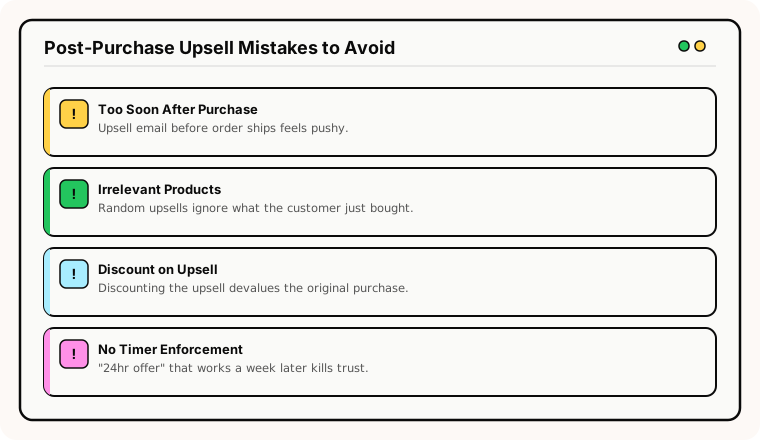
Upselling immediately in the order confirmation email. The order confirmation serves a functional purpose ("your order is confirmed"). Mixing urgency into it can feel pushy. Send the upsell as a separate email 1–2 hours later.
Irrelevant product suggestions. A timer on an unrelated product doesn't leverage the trust from the original purchase. The upsell must be logically connected.
Too many post-purchase emails with timers. One upsell timer is effective. Three upsell timers across a week feels aggressive. Reserve the timer for your single best upsell opportunity.
Timer disconnected from the CTA. Place the timer directly above the add-to-cart or buy button, not as a hero image at the top. See our placement best practices.
What to measure
Post-purchase conversion rate: What percentage of buyers add the upsell within the timer window? Compare timer cohort vs no-timer cohort.
Average order value (AOV) lift: Does the upsell increase total customer spend? Track the incremental revenue from upsell conversions.
Unsubscribe rate: If post-purchase timer emails drive higher unsubscribes, the offer is too aggressive or irrelevant.
Return rate on upsell products: Urgency-driven purchases can sometimes lead to buyer's remorse. Monitor return rates on upsell items vs organic purchases.
For the complete measurement framework, see our analytics and A/B testing guide.
Industry fit
Post-purchase timers are particularly effective for e-commerce, beauty (complementary products in a routine), electronics (accessories and warranties), pet brands (food and toy bundles), health and wellness (supplement stacks), and home and furniture (matching pieces).
ESP setup
Embed the evergreen timer URL in the post-purchase email template within your ESP's automation builder. Trigger the email 1–2 hours after purchase confirmation. For platform-specific instructions, see our guides for Klaviyo, Mailchimp, ActiveCampaign, HubSpot, and all supported integrations.
Get started
Create a free evergreen timer for your post-purchase flow. Set a 24 or 48-hour window, configure the expiry state, and embed in your order confirmation automation. Each buyer gets their own personal upsell window — no manual deadline management needed.