
Limited-edition products are inherently scarce — but that scarcity only drives action when customers can see the window closing. "Available while supplies last" creates vague anxiety. "The drop window closes in 6 hours" with a ticking countdown creates specific, actionable urgency.
Limited drops are one of the most natural use cases for countdown timers because the deadline is real. The production run is finite. The purchase window has a genuine end date. Unlike manufactured urgency, the timer reflects an actual constraint — which is exactly what makes it credible and effective.
According to Omnisend's 2025 benchmarks, automated emails generate $2.87 per email — 16× more than standard campaigns. A limited-edition drop with a visible countdown timer amplifies this by combining product scarcity with time scarcity in a way subscribers take seriously.
This guide covers how to structure limited-edition drop campaigns with timers, the email sequence that builds anticipation, and the credibility rules that make the urgency trustworthy. It builds on our complete countdown timer guide and flash sale playbook.
How it works
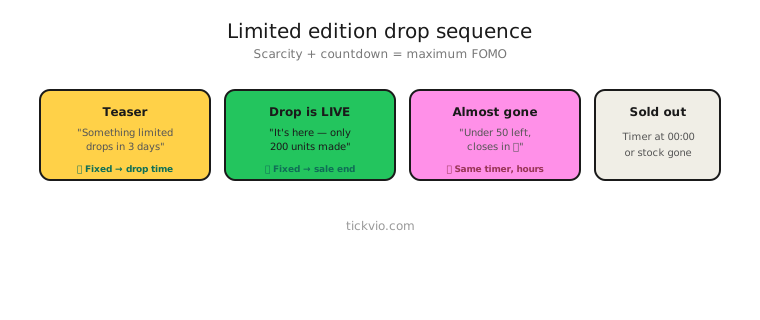
Use a fixed deadline timer counting down to when the purchase window closes. Everyone shares the same deadline, creating collective urgency — thousands of subscribers watching the same clock together amplifies the sense of competition for limited units.
For VIP early-access drops (where loyal customers get a head start), use an evergreen timer to give each VIP their own early-access window before the general drop opens.
Drop email sequence
Limited-edition drops follow a specific rhythm: build anticipation, create a launch moment, drive urgency as the window closes.
Email 1: Teaser (3–7 days before). No timer. Reveal the product or collection. Build desire. "Coming Friday: [Product]. Only [X] units." This email is about want, not urgency.
Email 2: Drop launch (hour zero). Timer in hero position. "The drop is live. [X] units available. Window closes in: [TIMER]." This is the anchor email — the first moment subscribers see the clock ticking.
Email 3: Progress update (midway). "[X]% sold. The drop window closes in [TIMER]. Don't wait." Timer in companion position. Social proof (units sold) is the focus; the timer adds time pressure.
Email 4: Last chance (final hours). Timer in hero position. "Last chance — [remaining units] left. Window closes in [TIMER]." Combine time scarcity with quantity scarcity. Only cite real numbers.
Email 5: Sold out / window closed (post-deadline). No timer. "The drop has ended — [Product] sold out in [X hours]." Reinforces the scarcity was real and builds credibility for the next drop. Offer a waitlist for the next release.
Copy frameworks
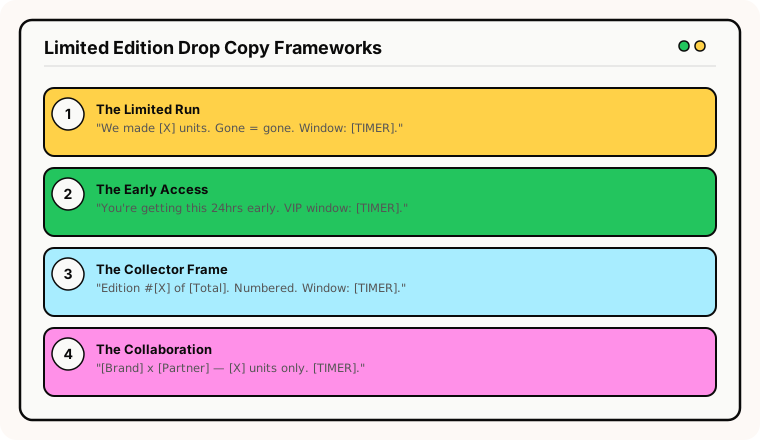
The "limited run" frame: "We made [X] units. When they're gone, they're gone. Drop window closes in [TIMER]." Simple, factual, credible.
The "early access" frame: "You're getting this 24 hours before the general release. Your VIP window closes in [TIMER]." Makes the subscriber feel privileged, not pressured.
The "collector" frame: "Edition #[X] of [Total]. Each piece is numbered. Purchase window: [TIMER]." Appeals to the collector mentality — limited numbering plus a closing window.
The "collaboration" frame: "[Brand] × [Collaborator] — limited to [X] units. Available for [TIMER] only." Collaboration drops with shared audiences create amplified demand.
Combining time and quantity scarcity
Limited-edition drops are unique because you can combine two types of scarcity: time (the purchase window) and quantity (the production run). This dual scarcity is more powerful than either alone — but both must be real.
Use the timer for the time deadline. Use text for the quantity: "[X] of [Total] remaining." Don't fake either number. Subscribers who buy a "sold out" item that's mysteriously available again two weeks later will never trust your drops.
Common mistakes
"Limited edition" that's always available. If the product doesn't actually sell out or the "limited" run keeps getting restocked, the timer is meaningless. Only use limited-edition framing for genuinely limited products.
Timer before the drop opens. A teaser email with a timer showing "5 days 12 hours" doesn't create urgency — it creates countdown fatigue before the drop even starts. Save the timer for the purchase window.
No waitlist for the next drop. Subscribers who miss the window should see a "join the waitlist for the next release" option, not a dead page. This turns missed urgency into future pipeline.
Restocking the "limited" product. If it's not actually limited, don't call it limited. Subscribers who discover the product available again after the timer expired will never trust your drops.
What to measure
Sellout speed: How quickly does the limited-edition product sell out? Faster sellout times with timer campaigns vs without indicate the timer is accelerating purchase decisions.
Revenue per drop email: Which email in the sequence drives the most revenue? Typically the launch (Email 2) and last-chance (Email 4) emails.
Waitlist conversion: What percentage of subscribers who miss this drop purchase the next one? A strong waitlist-to-purchase pipeline justifies the drop strategy.
Repeat drop engagement: Do subscribers open and click at consistent rates across multiple drops? Declining engagement signals the drops are happening too frequently or feel inauthentic.
For the complete measurement framework, see our analytics and A/B testing guide.
Industry fit
Limited-edition timers are most effective for fashion (seasonal collections, designer collaborations), beauty (limited-edition palettes, holiday sets), food and beverage (seasonal brews, batch releases), wine and spirits (allocation windows, vintage releases), gaming (collector's editions), and consumer electronics (limited-run colourways or special editions).
ESP setup
Drop timers work with every major email platform. For step-by-step instructions, see our guides for Klaviyo, Mailchimp, ActiveCampaign, HubSpot, and all supported integrations.
Get started
Create a free drop countdown timer — set the purchase window, customise the design, configure the post-drop expiry state (with waitlist redirect), and embed across your launch sequence. One timer URL, every email in the drop campaign. No credit card required.