
Content creators, course builders, and publishers have natural launch moments: enrolment opens, early-bird pricing ends, a new season drops, a cohort starts. A countdown timer transforms these into urgent, action-driving deadlines that fill seats and drive revenue.
The e-learning market continues to grow rapidly. According to Statista, the global e-learning market is projected to exceed $400 billion by 2027. For course creators, the challenge isn't demand — it's converting interest into enrolments before potential students move on. A visible countdown timer on early-bird pricing or enrolment deadlines creates the urgency that tips "interested" into "enrolled."
How it works
Use a fixed deadline timer for shared deadlines (enrolment closes on a specific date) or an evergreen timer for per-subscriber windows (early-bird pricing for 48 hours after signup). Choose based on whether everyone shares the same deadline or each person gets their own.
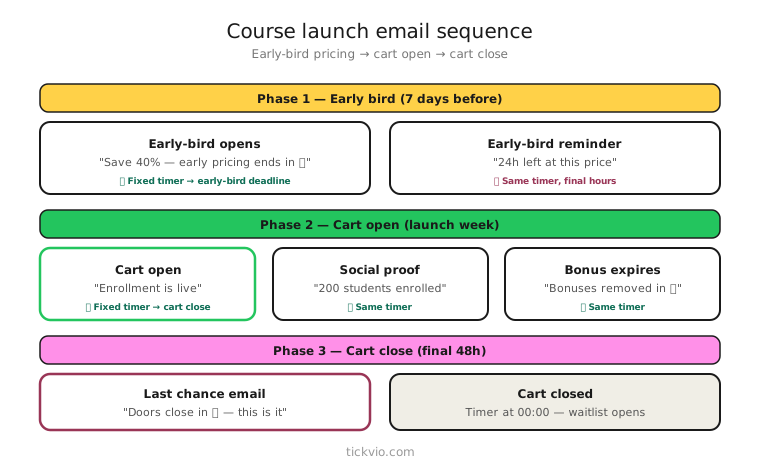
Launch email sequence
A course or content launch typically follows 4–5 emails, each with a specific role:
Email 1: Announcement (1–2 weeks before). Build anticipation. Share what the course covers, who it's for, and when doors open. No timer — it's too early for countdown urgency to be effective.
Email 2: Doors open / early-bird starts (launch day). Introduce the timer. "Early-bird pricing of $199 ends in [TIMER]. After that, it's $349." Timer in hero position. This is the anchor email — the first moment subscribers see the clock ticking.
Email 3: Social proof + reminder (midway). "142 students have already enrolled. Your early-bird price expires in [TIMER]." Timer in companion position. The social proof is the focus; the timer adds urgency.
Email 4: Last chance (final 24–48 hours). Timer back in hero position. "Early-bird pricing ends tonight. [TIMER]" Minimal copy, maximum urgency. This email typically drives the highest conversion rate in the sequence.
Email 5: Doors closed / launched (post-deadline). No timer. "Early-bird pricing has ended. The course is now available at regular pricing" or "Enrolment is closed — join the waitlist for the next cohort." This is where your expiry state matters.
The structure follows the same principles as a flash sale flow but with education-specific messaging that focuses on outcomes and transformation rather than discounts.
Early-bird pricing
Early-bird pricing is the most natural timer use case for course creators and content businesses. The price genuinely increases on a specific date — there's no manufactured urgency. The timer makes this financial deadline visual and credible.
The copy framework is straightforward: "The course launches at $349. For the next [TIMER], it's $199 — a $150 savings." The specificity of the savings amount and the visual countdown together create compelling urgency.
Follow best practices — honour the deadline, don't extend it. "Due to popular demand, we've extended early-bird pricing" destroys credibility. If subscribers learn your deadlines are flexible, no future timer will motivate them.
Cohort-based courses
If your course runs in cohorts with fixed start dates, a timer counting down to the cohort start date drives both registration and preparation. "Cohort 5 starts in 3 days" is motivating for people who've been considering signing up because it signals a real beginning — with real peers and a real schedule.
For cohort-based courses, you can layer two timer campaigns: one counting down to the enrolment deadline ("last day to join Cohort 5") and one counting down to the start date ("class begins in [TIMER] — set up your workspace"). Use different emails for each — never two timers in one email.
Content drops and season launches
Publishers, podcasters, and content creators can use timers for: new season or series launches ("Season 3 drops in [TIMER]"), limited-access content windows ("Premium article available for 72 hours"), and membership enrolment windows ("Annual subscription at launch pricing ends in [TIMER]").
Copy frameworks for course and content launches
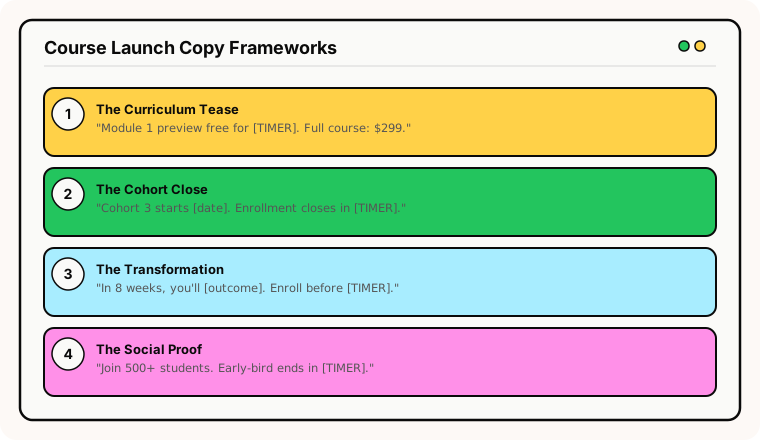
The "transformation" frame: "In 8 weeks, you'll be able to [specific outcome]. Enrolment closes in [TIMER]." Connects the deadline to a personal result.
The "price increase" frame: "In [TIMER], the price goes from $199 to $349. This is the only time we'll offer the launch price." Clear, specific, financial — the most credible urgency.
The "cohort" frame: "Cohort 5 starts [date]. Your seat is reserved for [TIMER]. After that, you'll have to wait for Cohort 6 in [month]." Combines time urgency with social proof (other students are starting).
The "limited seats" frame: "Only 30 seats per cohort. [X] spots remaining. Enrolment closes in [TIMER]." Only use if seat limits are real.
Landing page alignment
Your email timer and course landing page timer must show the same deadline. If the email says "Early-bird ends in 6 hours" but the landing page says "Enrolment open," trust breaks. For evergreen early-bird windows, pass the subscriber's deadline via URL parameter so the landing page shows their personal countdown.
Common mistakes
Timer in the announcement email. Two weeks before the launch, a timer showing "14 days" doesn't create urgency. Wait until doors open or the deadline is within 7 days.
Extending enrolment "due to demand." This destroys credibility permanently. If the timer said enrolment closes Tuesday, it closes Tuesday.
No post-close plan. Interested visitors who land on the course page after enrolment closes should see a clear waitlist signup, not a dead page. Configure your expiry state.
What to measure
Enrolment rate: Compare timer cohort vs no-timer cohort. Track both early-bird conversions and regular-price conversions.
Revenue per launch email: Which email in the sequence drives the most revenue? Typically the "last chance" timer email.
Waitlist signups from expiry state: After the deadline passes, are late visitors joining the waitlist? This measures the effectiveness of your post-expiry handling.
Course completion rate by entry source: Do students who enrolled during the timer window complete the course at the same rate as those who enrolled without urgency? If timer-driven students have lower completion, the urgency may be attracting the wrong audience.
For the complete measurement framework, see our analytics and A/B testing guide.
Industry fit
Ideal for online education and courses, books and publishing, gaming and entertainment (content seasons, beta access), and independent creators across every vertical.
ESP setup
Embed the timer URL in your launch sequence emails. For platform-specific instructions, see our guides for Klaviyo, Mailchimp, ActiveCampaign, HubSpot, and all supported integrations.
Get started
Create a free launch timer — set the enrolment deadline, customise the design to match your brand, configure the post-close expiry state, and embed in your launch sequence. One timer URL works across every email in the campaign. No credit card required.