
Gated content — webinar replays, masterclasses, exclusive reports, limited-access video series — loses its perceived value when it's available forever. "Watch the replay anytime" creates no urgency and generates low completion rates. "Replay access expires in 72 hours" with a ticking countdown creates a genuine reason to watch now.
According to Omnisend's 2025 data, automated emails generate 16× more revenue per send than standard campaigns. A gated content sequence with a visible access window converts content interest into content consumption — and consumption is what drives downstream conversions.
This guide covers how to use countdown timers to create access windows around gated content, the email sequence that drives completion, and how to measure whether the timer is lifting engagement. It builds on our complete countdown timer guide.
How it works
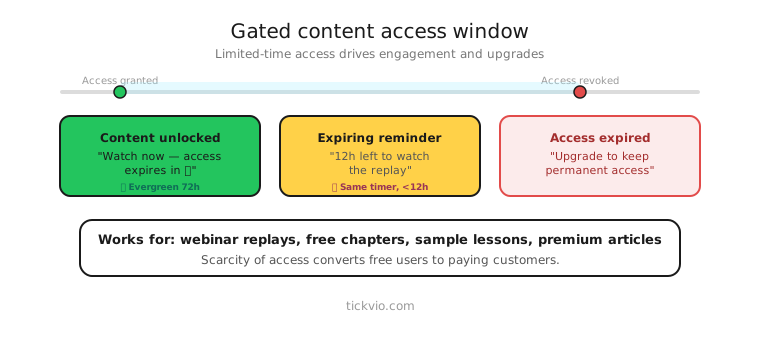
Use an evergreen timer so each subscriber gets their own access window from the moment they receive the content link. "Your replay access expires in: [TIMER]." The 48 or 72-hour window starts individually for each person.
Tickvio's evergreen timer feature handles per-recipient deadlines automatically. Set the access window, configure the design, and embed the timer URL in your content delivery email.
Gated content timer scenarios
Webinar replay: "Watch the replay before access expires in [TIMER]." The most common use case. Live attendees watched in real time; non-attendees get a limited window to catch up.
Masterclass or course preview: "Module 1 is free for [TIMER]. After that, the full course is $299." The timer creates a try-before-you-buy window that motivates immediate viewing.
Exclusive report or whitepaper: "Download the 2025 Industry Report before access closes in [TIMER]." Creates urgency around content that would otherwise sit in a "read later" pile.
Limited video series: "Episode 1 is available for [TIMER]. Episode 2 unlocks tomorrow." Drip-release content with per-episode access windows creates appointment viewing behaviour.
Bonus content: "Purchased [Product]? Access your bonus training before [TIMER]." Ties content consumption to a purchase, increasing perceived value of the original purchase.
Email sequence for gated content
Email 1: Content delivery + timer. "Your [replay/report/video] is ready. Access expires in: [TIMER]." Include a prominent CTA to the content. The timer is secondary to the content itself but creates the viewing deadline.
Email 2: Reminder (midway). "Your access expires in [TIMER]. Key takeaways you'll learn: [1, 2, 3]." Remind them what they'll miss, not just that time is running out.
Email 3: Last chance (final hours). "Your access expires tonight. [TIMER]." Minimal copy. Timer in hero position.
Post-expiry: "Your access window has closed. Want the full course/membership? [CTA]." Use the expiry state to transition from free content to paid conversion.
Copy frameworks
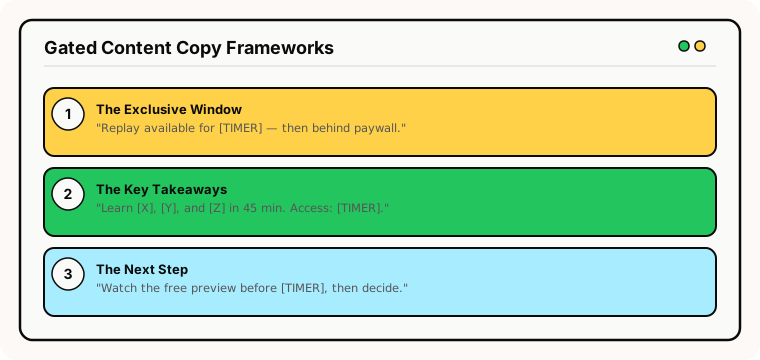
The "exclusive window" frame: "This replay is available for [TIMER] — after that, it's behind the membership paywall." Makes free access feel like a privilege.
The "key takeaways" frame: "In 45 minutes, you'll learn [takeaway 1], [takeaway 2], and [takeaway 3]. Access expires in [TIMER]." Sells the content's value alongside the deadline.
The "next step" frame: "Watch the free preview before [TIMER], then decide if the full programme is right for you." Positions the gated content as part of a buying journey.
Why access windows improve content outcomes
Unlimited access paradoxically reduces content consumption. When a webinar replay is "available anytime," subscribers save it for later — and later never comes. A 48-hour access window creates a commitment: "I need to watch this before Thursday."
This principle also applies to content-driven sales funnels. If the purpose of the gated content is to demonstrate expertise and drive course/product sales, consumption is the critical metric — not just opt-ins. Subscribers who watch the content are far more likely to convert than those who download it and never open it.
Common mistakes
Access window but no enforcement. If the content is still accessible after the timer expires, subscribers learn the window is fake. Either actually restrict access or use softer framing.
Timer without content value. A countdown that says "watch before time runs out" without explaining what's in the content creates pressure without desire. Lead with value, then add the deadline.
Too short a window. 24 hours may not be enough for a 90-minute webinar replay — subscribers need realistic time to schedule viewing. 48–72 hours is the sweet spot for most content types.
What to measure
Content completion rate: What percentage of subscribers who receive access actually watch/read/download within the timer window? Compare timer vs no-timer cohorts.
Downstream conversion: Do subscribers who consume the gated content convert to paid products at a higher rate? This is the metric that justifies the content strategy.
Access after expiry attempts: How many subscribers try to access content after the window closes? High numbers indicate strong interest — consider using this as a sales trigger.
For the complete measurement framework, see our analytics and A/B testing guide.
Industry fit
Gated content timers work for online education (course previews, webinar replays), SaaS (product demos, feature webinars), coaching and consulting (masterclass replays), media and publishing (premium content windows), financial services (market reports), and health and wellness (training videos).
ESP setup
Gated content timers work with every major email platform. For step-by-step instructions, see our guides for Klaviyo, Mailchimp, ActiveCampaign, HubSpot, and all supported integrations.
Get started
Create a free content access timer — set the viewing window (48 or 72 hours), customise the design, configure the expiry state to redirect to your sales page, and embed in your content delivery emails. No credit card required.