
Event registration deadlines are among the most credible use cases for countdown timers — the deadline is real, imposed by logistics, not marketing. Venue capacity, catering headcounts, and speaker scheduling all require a hard registration cutoff.
The problem is that interested attendees procrastinate. They see the event email, intend to register, and then forget. According to Omnisend's 2025 data, automated emails generate 16× more revenue per send than standard campaigns. An event registration flow with a visible countdown converts interested prospects into confirmed registrants before procrastination wins.
This guide covers how to structure event registration timer campaigns for conferences, workshops, meetups, and virtual events. It builds on our complete countdown timer guide.
How it works
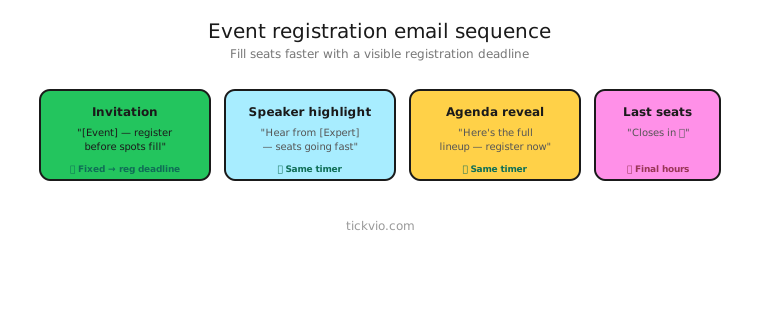
Use a fixed deadline timer counting down to the registration cutoff. Everyone shares the same deadline — when registration closes, it closes for everyone.
For events with tiered pricing (early-bird, regular, last-minute), use separate timers for each pricing transition. The early-bird timer counts to the first price increase; the final timer counts to registration close.
Event registration email sequence
Email 1: Event announcement + registration opens. "[Event Name] — [Date]. Registration is open. Early-bird pricing available until [TIMER]." Lead with the event value proposition — speakers, content, networking — then anchor with the timer. Timer in companion position.
Email 2: Speaker/agenda reveal (midway). "Here's what you'll learn at [Event]. [Speaker lineup / agenda highlights]. Register before [TIMER]." Build desire with content details. Timer is secondary to the agenda.
Email 3: Social proof + spots filling. "[X] attendees registered. Registration closes in [TIMER]." Combine the countdown with attendance numbers. Social proof validates the event quality.
Email 4: Last chance (final 24–48 hours). "Registration closes in [TIMER]. After that, no walk-ins / no exceptions." Timer in hero position. Be clear about what happens when registration closes — no day-of registration, no waitlist, done.
Email 5: Post-registration close. No timer. "Registration for [Event] is now closed. Join the waitlist for next time." Confirms the deadline was real.
Pricing tier transitions
Many events have multiple pricing tiers. Each transition deserves its own timer moment:
Early-bird → Regular: "Early-bird pricing ends in [TIMER]. After that, tickets go from $X to $Y." See the full early-bird pricing strategy.
Regular → Last-minute: "Regular pricing ends in [TIMER]. Last-minute tickets are $Z." This creates urgency even for subscribers who missed early-bird.
Last-minute → Closed: "Registration closes in [TIMER]. This is the final opportunity." The highest-urgency moment in the sequence.
Copy frameworks
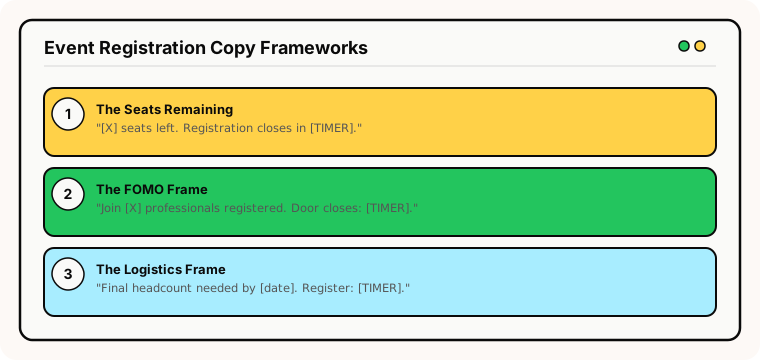
The "seats remaining" frame: "[X] seats left. Registration closes in [TIMER]." Combines capacity scarcity with time scarcity — both credible for events.
The "FOMO" frame: "Join [X] professionals already registered. Door closes in [TIMER]." Social proof plus countdown.
The "logistics" frame: "We need final headcount by [date] for venue and catering. Registration closes in [TIMER]." Transparent about why the deadline exists — subscribers respect operational honesty.
Common mistakes
"Extended" registration. If registration was supposed to close Friday and you extend to Monday, every registrant who rushed to register feels foolish. Extending deadlines trains your audience to wait.
Timer without event details. A countdown to "register now" without explaining what the event is creates pressure without desire. Always lead with value, then add the deadline.
No post-close plan. Subscribers who open after registration closes should see "Registration is closed — join the waitlist" via the expiry state, not a frozen 00:00:00.
What to measure
Registration rate by email: Which email in the sequence drives the most registrations? Typically the last-chance email.
Registration timeline: What percentage of registrations happen in the final 24 hours? If it's very high, your earlier emails may not be compelling enough.
Show-up rate: Do timer-driven registrants actually attend at the same rate as early registrants? If not, the timer may be creating impulsive commitments.
For the complete measurement framework, see our analytics and A/B testing guide.
Industry fit
Event registration timers work for conferences and events, online courses and workshops, SaaS (user conferences, product demos), fitness (class registration), nonprofits (fundraising events, galas), and membership organisations (annual meetings).
ESP setup
Event timers work with every major email platform. For step-by-step instructions, see our guides for Klaviyo, Mailchimp, ActiveCampaign, HubSpot, and all supported integrations.
Get started
Create a free event registration timer — set the registration cutoff, customise the design, configure the expiry state, and embed across your event promotion emails. No credit card required.