
Birthday and anniversary emails are among the highest-performing automated messages in email marketing. According to Omnisend's 2025 benchmarks, automated emails generate $2.87 per email versus $0.18 for standard campaigns — a 16× revenue difference. Birthday emails are a standout within that category, with average order values exceeding $744 according to the same data.
The challenge with birthday offers is that subscribers often intend to use them but never get around to it. The email arrives, they think "nice, I'll use that later," and then it's forgotten. A countdown timer transforms that passive goodwill into active urgency: "Your birthday treat expires in 48 hours" with a ticking clock is fundamentally different from a text-only mention of the same deadline.
This guide covers how to structure birthday and anniversary timer campaigns, which timer type to use, and how to measure whether the timer is actually lifting conversions. It builds on our complete countdown timer guide and best practices.
How it works
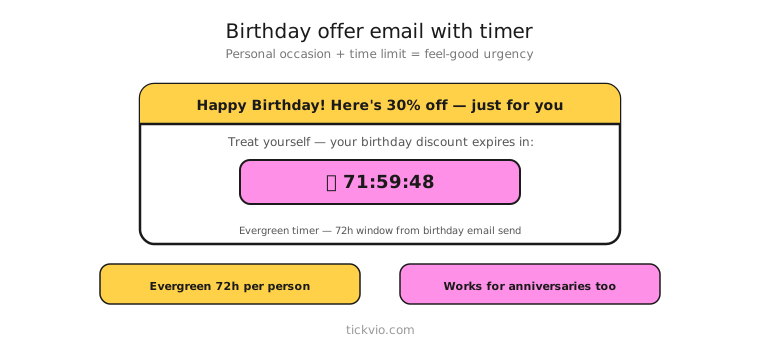
Use an evergreen timer tied to each subscriber's birthday or anniversary date. The timer creates a personal redemption window — typically 48 to 72 hours — that starts from when the birthday email is sent.
Tickvio's evergreen timer feature handles this automatically. Set the countdown window (48 or 72 hours), configure the design, and embed the timer URL in your birthday automation. Each subscriber sees their own personal countdown based on their date.
For wedding anniversaries, membership milestones, or signup anniversaries, the same evergreen approach works — the trigger is different but the timer logic is identical.
Birthday email sequence
A birthday timer campaign typically spans two to three emails around the subscriber's date:
Email 1: Birthday greeting + offer + timer (on or just before the birthday). Lead with genuine warmth, then introduce the offer. "Happy birthday! Here's 20% off — your personal treat expires in: [TIMER]." The timer should be placed near the CTA, not as a hero image.
Email 2: Reminder (midway through the window). Same timer, now showing less time. "Your birthday discount expires in [TIMER] — don't let it go to waste." This catches subscribers who saw Email 1 but didn't act.
Email 3 (optional): Last chance (final hours). Only send for 72-hour windows. "Your birthday treat expires tonight. [TIMER]" Minimal copy, maximum urgency.
After the timer expires, the discount code must stop working. The next email in the flow should shift to non-discount content — product recommendations, brand story, or a simple "hope you had a great birthday" message with no offer.
Anniversary variations
Signup anniversary: "It's been 1 year since you joined [Brand]. Here's a personal thank-you: 15% off for the next 48 hours. [TIMER]" Celebrates the relationship while driving a purchase.
Wedding anniversary (jewellery, gifts, travel): "Your anniversary is coming up — here's something special. [TIMER]" Time the email 1–2 weeks before the date to allow for shipping or booking.
Loyalty milestone: "You've spent $500 with us this year. Unlock your VIP reward before [TIMER]." Combines achievement recognition with a redemption deadline.
Copy frameworks
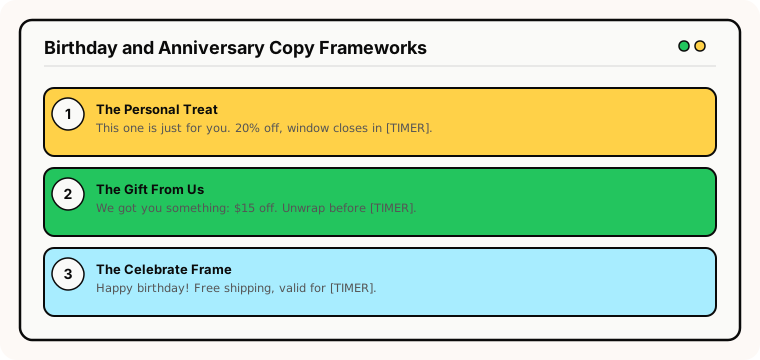
The "personal treat" frame: "This one's just for you. 20% off anything in the store — your birthday window closes in [TIMER]." Warm, personal, specific deadline.
The "gift from us" frame: "We got you something: $15 off your next order. Unwrap it before [TIMER]." Frames the discount as a gift, which feels different from a standard sale.
The "celebrate" frame: "Happy birthday! Celebrate with free shipping on any order — valid for [TIMER]." Works well when the incentive is free shipping rather than a percentage discount.
Enforcement matters
Birthday discounts without enforcement train subscribers to ignore future timers. The code must expire when the timer hits zero. If it still works a week later, the subscriber has learned that your "48-hour window" is theatrical.
This is especially important for birthday campaigns because they repeat annually. A subscriber who discovers the code works indefinitely will never take next year's birthday timer seriously. See our enforcement checklist for implementation details.
Configure a proper expiry state: "Your birthday offer has expired — browse our latest arrivals" keeps the subscriber engaged rather than frustrated.
Common mistakes
Sending too early. A birthday timer 2 weeks before the birthday feels premature. Send on or within 1–2 days of the actual date for maximum emotional resonance.
Generic messaging. "Happy birthday, here's a discount" doesn't feel personal. Use the subscriber's name, reference their history with your brand, and make the offer feel special — not like a mass campaign.
No post-expiry plan. Subscribers who open the email after their birthday window should see a helpful expiry state, not a frozen 00:00:00. Configure this before launching.
Same offer every year. If subscribers get identical 20% off every birthday, the timer loses its edge. Vary the incentive: free shipping one year, a gift-with-purchase the next, a different discount tier.
What to measure
Redemption rate: What percentage of subscribers use their birthday discount within the timer window? Compare timer cohort vs no-timer cohort.
Revenue per birthday email: The primary performance metric. Given that birthday emails can generate order values 4× higher than standard campaigns per Omnisend's data, this number should be strong.
Discount usage after expiry: The enforcement audit. If codes are used after the timer hits zero, there's a gap in your setup.
Annual repeat engagement: Do subscribers who received a birthday timer last year open this year's email at the same rate? Declining engagement signals fatigue or eroded trust.
For the complete measurement framework, see our analytics and A/B testing guide.
Industry fit
Birthday and anniversary timers work across virtually any business with a subscriber relationship: fashion and beauty (personal treat discounts), food and beverage (free birthday item), health and wellness (milestone rewards), jewellery (anniversary reminders), travel and hospitality (birthday getaway deals), and subscription boxes (birthday surprise box).
ESP setup
Birthday timers work within any ESP that supports date-triggered automations. Set the flow to trigger on the subscriber's birthday field. For platform-specific instructions, see our guides for Klaviyo, Mailchimp, ActiveCampaign, HubSpot, and all supported integrations.
Get started
Create a free evergreen timer for your birthday flow. Set the window (48 or 72 hours), customise the design to match your brand, configure the expiry state, and embed in your birthday automation. Each subscriber gets their own personal countdown — making their birthday offer feel genuinely exclusive. No credit card required.