
Back-in-stock emails target subscribers who explicitly asked to be notified — they've already expressed purchase intent for a specific product. According to Omnisend's 2025 data, automated emails generate 16× more revenue per send than standard campaigns. Back-in-stock alerts are among the highest-intent automated triggers you can send.
The problem is that restocked items can sell out again quickly, but the subscriber doesn't know that. A countdown timer makes the urgency concrete: "This item is back — your reserved window expires in 24 hours" creates a visible deadline that converts intent into immediate action.
This guide covers how to structure back-in-stock timer campaigns, which timer type to use, and the strategies that prevent restocked items from sitting in "I'll buy it later" limbo. It builds on principles from our complete countdown timer guide.
How it works
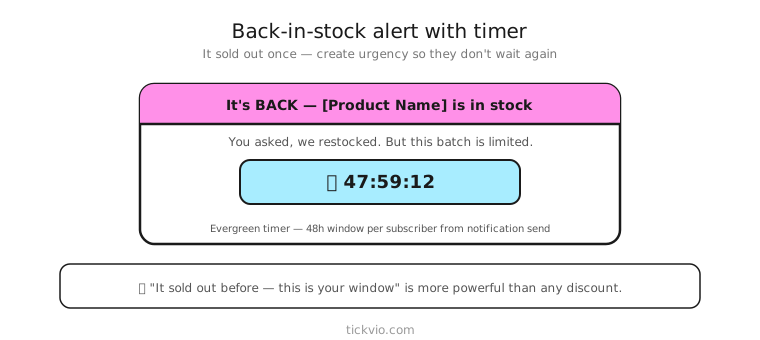
Use an evergreen timer so each subscriber gets their own purchase window from the moment they receive the notification. "This item is back in stock — your priority window expires in: [TIMER]." The 12 or 24-hour window starts individually for each person, which is important because back-in-stock notifications fire at different times as inventory is processed.
Tickvio's evergreen timer feature handles the per-recipient deadline automatically. Set the window (12 or 24 hours), configure the design, and embed the timer URL in your back-in-stock automation.
Back-in-stock email sequence
Back-in-stock flows are typically short — the subscriber already wants the product, so the job is speed, not persuasion:
Email 1: Alert + timer (immediately on restock). "Good news — [Product] is back in stock. Your priority purchase window: [TIMER]." Include the product image, price, and a single CTA. The timer creates the deadline the subscriber didn't know they needed.
Email 2: Reminder (midway through the window). "Still available — but your window closes in [TIMER]. This item sold out once before." Same timer, shrinking countdown. This catches subscribers who saw Email 1 on mobile but planned to buy on desktop later.
Email 3: Post-expiry (no timer). "Your priority window has ended. [Product] is still available while supplies last — but we can't guarantee stock." Remove the personal urgency and shift to general availability messaging.
Timer framing strategies
The framing matters because back-in-stock timers aren't counting down to a sale ending — they're counting down to the end of a priority window. The distinction affects credibility:
The "priority access" frame: "You asked to be notified first. Your priority window to purchase [Product] expires in [TIMER]. After that, it's available to everyone." Frames the timer as a reward for signing up for the waitlist.
The "reservation" frame: "We've reserved [Product] for waitlist members for 24 hours. Your reservation expires in [TIMER]." Implies limited allocation for waitlist subscribers.
The "history" frame: "This item sold out in 3 days last time. It's back — your window: [TIMER]." Uses past sellout data to justify the urgency. Only use if the data is real.
Copy frameworks
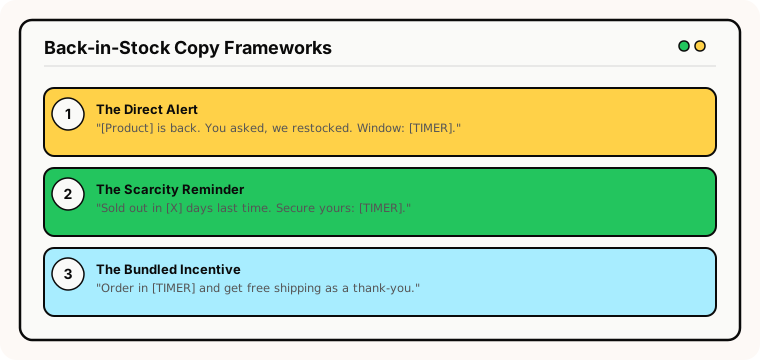
The direct alert: "[Product] is back. You asked, we restocked. Your purchase window closes in [TIMER]." Clean, specific, respects the subscriber's original request.
The scarcity reminder: "Back in stock — for now. [Product] sold out in [X days] last time. Secure yours before [TIMER]." Combines restock excitement with historical scarcity.
The bundled incentive: "It's back. Order [Product] in the next [TIMER] and get free shipping as a thank-you for waiting." Adds a time-limited incentive on top of the restock notification.
Common mistakes
Sending when stock is uncertain. If you trigger the back-in-stock email before inventory is confirmed, subscribers click through to an out-of-stock page. Ensure your inventory system confirms availability before the automation fires.
Timer without real consequence. If the "priority window" doesn't actually mean anything — the product is equally available to everyone — subscribers will figure this out. Either reserve actual inventory for waitlist subscribers or use softer framing like "we recommend acting quickly."
Too many follow-ups. Back-in-stock flows should be 2–3 emails maximum. The subscriber already wants the product. If they haven't bought after 2 reminders, more emails won't change their mind — they've decided the price or timing isn't right.
No expiry state. Subscribers who open after the window closes should see "Your priority window has ended — [Product] is still available while supplies last" rather than a frozen 00:00:00. Configure a proper expiry state.
What to measure
Purchase rate within the timer window: What percentage of notified subscribers buy during their priority window? This is the primary success metric.
Time to purchase: How quickly do subscribers buy after receiving the notification? If most purchases happen in the first 2 hours, a 24-hour window may be longer than necessary.
Sellout speed after notification: Does the restocked item sell out faster when timer emails are used vs plain notifications?
Waitlist-to-purchase conversion: The end-to-end metric. Of everyone who signed up for the waitlist, what percentage ultimately purchased?
For the complete measurement framework, see our analytics and A/B testing guide.
Industry fit
Back-in-stock timers are particularly effective for fashion and apparel (seasonal restocks, popular sizes), beauty (cult-favourite product restocks), consumer electronics (high-demand product restocks), home and furniture (limited-run items), and food and beverage (seasonal or limited-batch products).
ESP setup
Back-in-stock timers work within any ESP that supports inventory-triggered automations. For platform-specific instructions, see our guides for Klaviyo, Mailchimp, ActiveCampaign, HubSpot, and all supported integrations.
Get started
Create a free evergreen timer for your back-in-stock flow. Set a 12 or 24-hour window, customise the design, configure the expiry state, and embed in your restock notification automation. Each subscriber gets their own priority purchase window. No credit card required.