
Missed appointments cost service businesses real revenue. According to Zippia's research, the average no-show rate across industries is around 20%, with healthcare averaging 23%. Every missed appointment is lost revenue plus an empty time slot that could have served another customer.
A countdown timer in appointment reminder emails makes the upcoming booking feel immediate and concrete. "Your appointment is in 23:42:11" is psychologically different from "Your appointment is tomorrow at 2 PM" — the ticking clock creates a sense that preparation and action are needed now, not later.
This guide covers how to use countdown timers in appointment reminder flows, the sequence structure that reduces no-shows, and how to measure the impact on your scheduling efficiency. It builds on our complete countdown timer guide.
How it works
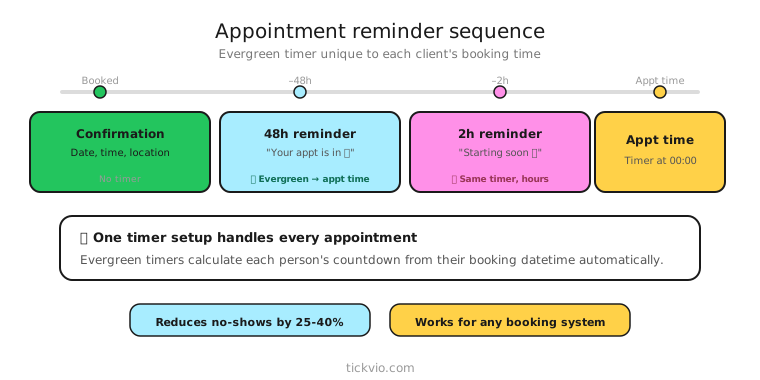
Use a fixed deadline timer counting down to the appointment time itself. The timer doesn't count down to a purchase deadline — it counts down to the event the subscriber has already committed to attend.
For booking windows where you want to drive appointment scheduling (e.g., "Book your free consultation in the next 48 hours"), use an evergreen timer to give each subscriber their own booking deadline.
Appointment reminder sequence
Email 1: Confirmation + countdown (immediately after booking). "Your appointment is confirmed for [Date] at [Time]. Your appointment is in: [TIMER]." This email serves as both confirmation and the first countdown. Include location/login details, preparation instructions, and reschedule/cancel options.
Email 2: 24-hour reminder. "Your appointment is tomorrow. [TIMER] until your [appointment type]. Here's what to prepare/bring." The timer now shows hours, creating a sense of immediacy. Include any preparation steps specific to the appointment type.
Email 3: Final reminder (2–4 hours before). "Your appointment starts in [TIMER]. [Location/link details]." Minimal copy. Timer in hero position. Include a prominent "I need to reschedule" option — it's better to reschedule than no-show.
Beyond no-show reduction: booking window timers
Appointment timers aren't just for reminders — they can also drive initial bookings:
Consultation booking window: "Book your free consultation in the next [TIMER]. After that, the next available slot is [weeks] away." An evergreen timer that creates urgency around scheduling, not just attending.
Limited availability slots: "Only [X] openings this month. Book before [TIMER]." Combines scarcity with a deadline.
Post-purchase onboarding: "Schedule your setup call in the next [TIMER] to get started this week." Motivates new customers to book onboarding while engagement is high.
Copy frameworks
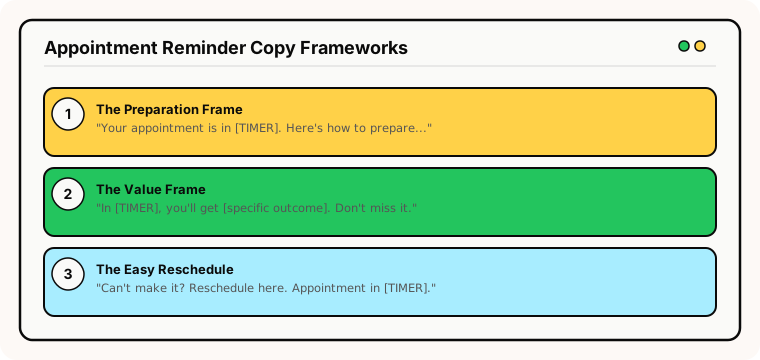
The "preparation" frame: "Your appointment is in [TIMER]. Here's how to prepare: [1, 2, 3]." Shifts the subscriber from passive waiting to active preparation. Preparation increases commitment and reduces no-shows.
The "value" frame: "In [TIMER], you'll get [specific value/outcome from the appointment]. Don't miss it." Reminds the subscriber why they booked in the first place.
The "easy reschedule" frame: "Can't make it? No problem — reschedule here. But if you're coming, your appointment starts in [TIMER]." Reduces no-shows by making rescheduling frictionless. A cancelled appointment you can rebook is better than a no-show.
Common mistakes
No reschedule option. If subscribers can't easily reschedule from the reminder email, they're more likely to simply not show up. Always include a reschedule link.
Too many reminders. Three reminders (confirmation, 24-hour, 2-hour) is the standard. More than that feels like harassment and can increase cancellations rather than reduce no-shows.
Timer without location/details. The subscriber needs to know where to go or how to join. A timer counting down to an appointment without meeting details creates anxiety, not preparation.
What to measure
No-show rate: The primary metric. Compare no-show rates with timer reminders vs without. Even a 5-percentage-point reduction has significant revenue impact for service businesses.
Reschedule rate: Are more people rescheduling (rather than no-showing) after receiving timer reminders? Rescheduling is a positive outcome — the slot gets freed for someone else.
Reminder open rate: Do subscribers engage with the timer reminders? If open rates are low, the reminders aren't reaching people in time — consider SMS supplementation.
For the complete measurement framework, see our analytics and A/B testing guide.
Industry fit
Appointment timers are essential for healthcare and wellness (medical appointments, therapy sessions), beauty and spa (salon appointments), coaching and consulting (client calls), fitness (class reservations, personal training), SaaS (demo calls, onboarding sessions), and real estate (property viewings).
ESP setup
Appointment timers work with every major email platform. For step-by-step instructions, see our guides for Klaviyo, Mailchimp, ActiveCampaign, HubSpot, and all supported integrations.
Get started
Create a free appointment countdown timer — set the appointment time, customise the design to match your brand, and embed in your booking confirmation and reminder automations. No credit card required.